Post 1 – Customizing Salesforce with Lightning Aura Components series

This will be the first of a series of posts I will be doing over the next few weeks. They will all lead up to the introduction of my new course titled, “Customizing Salesforce with Lightning Aura Components” from Pluralsight. This course is a total re-write of my most popular course (so far), “Customizing Salesforce with Lightning Components: Getting Started“, which was released back in 2017. It will focus on using the new modern toolset that Salesforce offers as part of Salesforce DX.

Understanding the Lightning Component Framework

Lightning components (now called Aura components) were introduced in 2014. At that time, the web standards that existed offered only a limited amount of what developers needed and that is why Salesforce built them on top of the Aura Framework. It was basically, to compensate for what the standards lacked.

Flash forward to 2019 and a LOT has changed in the web development world. That is why in 2019, Salesforce announced the release of Lightning Web Components (LWC’s). It was also at that time that the original Lightning Components were renamed to Aura Components. They co-exist and are completely interoperable with LWC’s.

Who Should be Building Aura Components?

It probably will not surprise you to know that Salesforce developers are perfect for this, but what you might not realize is that so are junior Salesforce developers.

Salesforce Developer
Senior or Junior Salesforce Developers

Another group you may not think of is Salesforce Administrators. You see, Aura components are way simpler to create then Lightning Web Components. Yes, they do still require the developer to know a little about HTML and JavaScript, but since the introduction of Lightning components back in 2014, they have gotten a lot simpler to work with. So, as long as the Admin is seasoned and may even consider themselves as a Super Admin, then I think they too can embrace creating Aura components.

Salesforce Super Admins

Where Can Aura Components Be Used?

Lightning pages

This includes App pages, Home and Record Pages, and even a new Embedded Service Page. The embedded service page will not be covered in this course, but the app and home pages will.

Wizard from Lightning App Builder

salesforce mobile app

In late 2019, Salesforce launched a new and completely redesigned Salesforce Mobile App. You can learn more about it by visiting the New Salesforce Mobile App Quickstart in Setup. This will be covered in the final module on “Creating Components for Salesforce Mobile”.
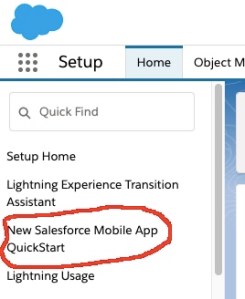
Access the New Salesforce Mobile App QuickStart from Setup

Other places

These other areas are beyond the scope of this course, but just so you are aware, there is also:

  1. Quick Actions
  2. Stand-alone apps
  3. Inside Visualforce pages
  4. On other platforms such as Heroku, using Lightning Out

Anatomy of an Aura Component Bundle

An Aura component can be made up of several physical files that reside in what is known as a component bundle. Even though there are 8 files that can make up a component bundle, most simple components will only need to access a couple:

  1. Component or Markup file – Uses a .cmp file extension and is a required file and there can only be one per bundle. All markup must be encased in an <aura:component> tag and can include references to other components.
  2. Controller or JavaScript file – Uses a .js file extension and will contain all the client-side methods needed to handle events in your component.

Creating an Aura Component Bundle

The easiest way to create an Aura component is using the online Developer Console. This will be covered only once in this first module. The rest of the course will cover creating bundles using the new modern toolsets.

You can access the Developer Console by logging into a Developer org, click the gear icon and select Developer Console.
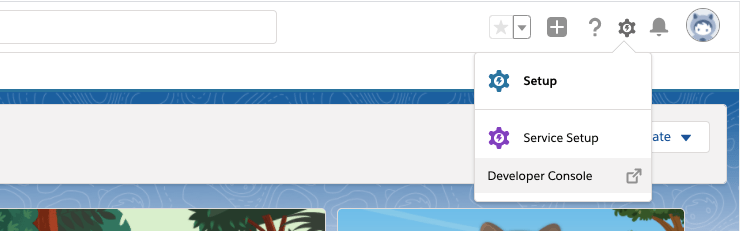
Access the online Developer Console

This will launch a new window and from here, you can go to File -> New -> Lightning Component.
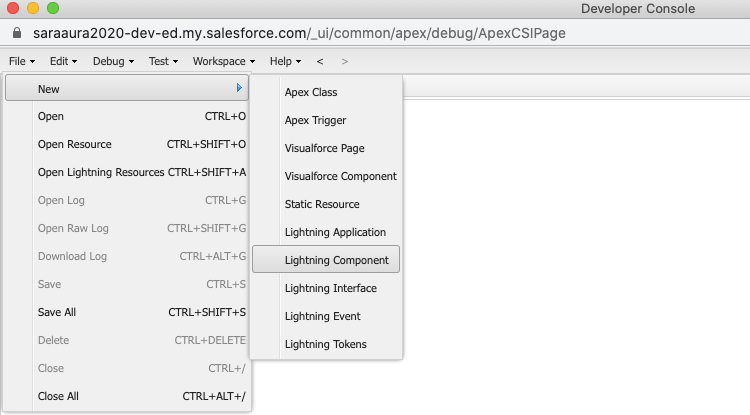
Create a new Lightning Component in Developer Console

The initial component I will show viewers how to build is very simple and will be used by Salespeople to update their cell number. From the New Lightning Bundle dialog, you only need to enter the name “updateCellNumber” and select the Lightning Tab and Lightning Page checkboxes in Component Configuration. And finally click Submit.

Create new Lightning Bundle in Developer Console

The component markup will be very simple to begin with and will include 3 Lightning Base Components. as the course progresses, this component, along with others will be expanded upon.

<aura:component implements="force:appHostable,flexipage:availableForAllPageTypes" access="global" >
  <lightning:card title="Update Cell Number">
    <p class="slds-p-horizontal_small">
      <lightning:input aura:id="phone" type="tel" label="Cell Phone Number" name="phone" placeholder="343-343-3434" pattern="[0-9]{3}-[0-9]{3}-[0-9]{4}"/>
      <lightning:button variant="brand" label="Submit" title="Submit" onclick="{! c.handleClick }" />        
    </p>
  </lightning:card>  
</aura:component>

The JavaScript will also be simple to begin with and will only be used to display the phone number in a Windows Alert box.

({
	handleClick : function (cmp, event, helper) {
        alert('phone: ' + cmp.find("phone").get("v.value"));
    }

})

Stay tuned for the remaining modules and posts in the next few weeks. All leading up to the release of the Pluralsight course.

Why You Really Need to Checkout the Open Source Base Lightning Components Now

As you hopefully know, Lightning Web Components (LWC’s) were introduced in 2019. Right away, Don Robins met with Salesforce expert, Chuck Liddell and they produced a free Pluralsight course, titled, “Play by Play: Understanding Lightning Web Components for Salesforce Developers“.

In that course, Chuck walked everyone through the Open Source Recipes Repo that Salesforce provided when it first released LWC’s. I remember in one part of that excellent course, that Chuck mentioned that we could not see the source code for any of the base Lightning components. Specifically, he mentioned the lightning:card component. In the course he said,

“And if I were able to look at the source code for that component, I’m sure that I would see that their attribute title is a type Aura Component Array…”

Well, the GREAT news is that Salesforce has released all those Base Lightning Components as open source on GitHub. So now everyone can see that code and learn about the best practices that Salesforce has implemented in those components.

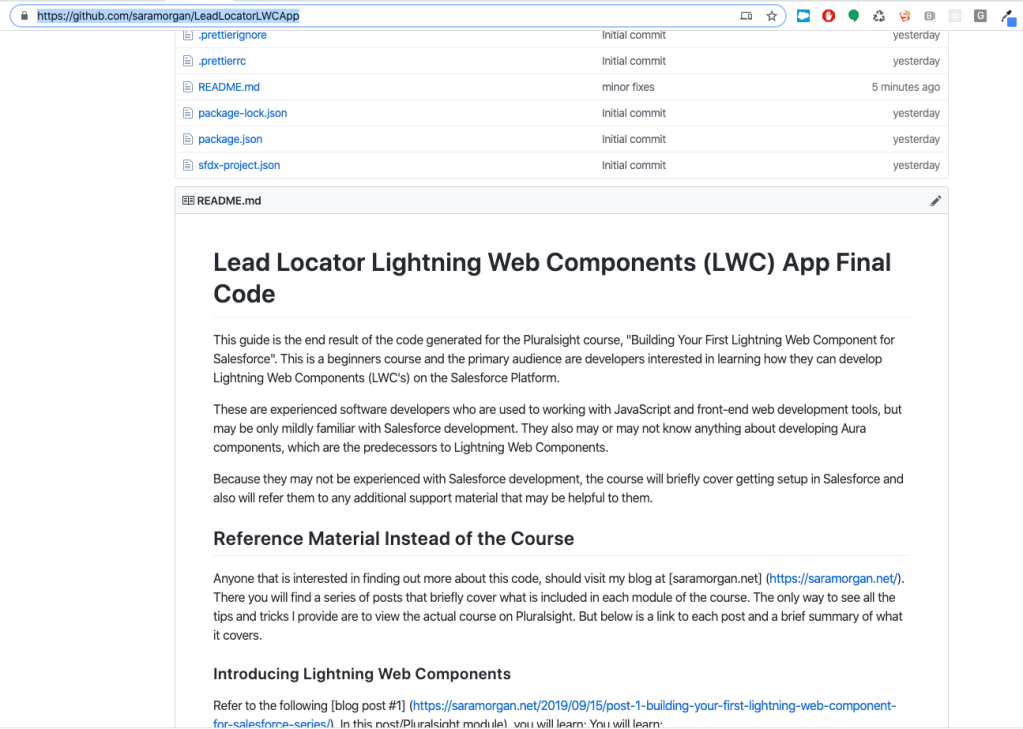
Anyone can clone or download the source code and then follow the directions in the README to spin up these components in a scratch org. Once you do, you can open that scratch org and using the App Launcher, browse to the Base Components app. From here, they can select one of the tabs, such as the one for the Layout Components, and see first-hand how that lightning Card component works, as well as click the link to view the source.

Is that not the coolest thing in the world? I sure think so.

I would be remiss if I did not also mention the Pluralsight course I just released called, “Building Your First Lightning Web Component for Salesforce“. It is not free, but come on, Pluralsight is soooooo worth the subscription cost.

Come see my Dreamforce talk about Lightning Fast Components

If you are attending this year’s Dreamforce, I would love for you to come see me talk about the 5 Ways to Build Lightning Fast Components.  The 5 tips I am presenting are the best ones I learned while doing the research for my upcoming Pluralsight course called, Lightning Component Development Best Practices.

Here are the details for the Dreamforce talk:

  • When: Thursday, November 9th (10:15 AM – 10:35 AM)
  • Where: Moscone West, Developer Theatre

This is my third time to speak at Dreamforce and it will be especially memorable this year as it is also going to be my first week as a Salesforce employee. Yep, if you haven’t heard, I am joining the Ohana and specifically, the amazing Trailhead team.

So please stop by and be sure to say hello…

SFDreamforce2017.jpg


Lightning Best Practice: Adding Pagination to Lists

Pagination

What happens to a Lightning Component that displays a list of data without pagination?

It is probably doomed to suffer from performance problems and who wants to build a component that is doomed? Certainly not you, right?

It’s possible that Salesforce might release a pagination component at some point in the future, but until they do, you will need to roll out your own. Fortunately, it is not too terribly complicated and in this post I will walk you through how to do it.

To begin, I must give credit where credit is due and acknowledge that the paginator component I am using in this post is almost identical to the one used in the Dreamhouse application (which if you have not checked out, you really need to do so).

The markup code for the Paginator component is as follows:

Paginator

And the Controller code looks like this:

({
	previousPage : function(component) {
        var pageChangeEvent = component.getEvent("pagePrevious");
        pageChangeEvent.fire();
	},
    
	nextPage : function(component) {
        var pageChangeEvent = component.getEvent("pageNext");
        pageChangeEvent.fire();
	}
})

Additionally, I use a component event called PageChange which looks like this:

PageChange
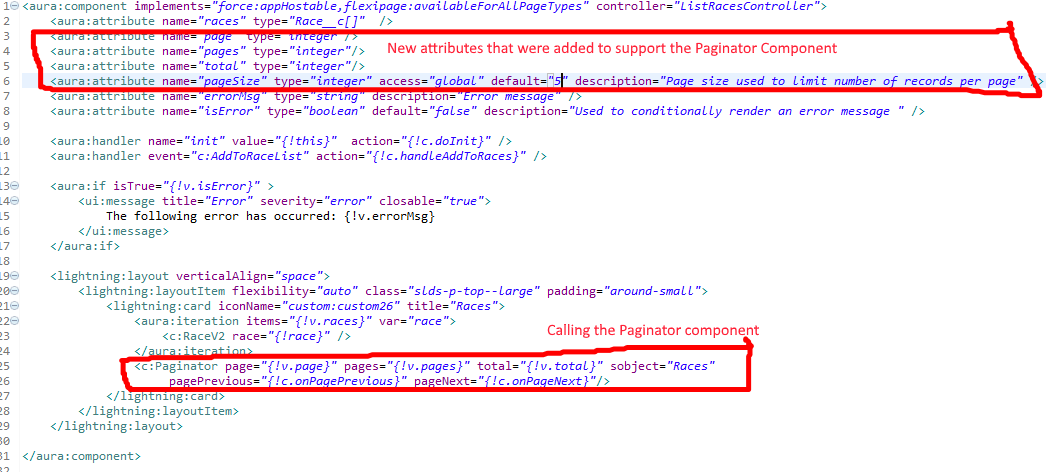
Ok, so I have a component that currently renders a list of race data. To make it work with the paginator component through, I will have to make a few changes to both the markup,  controller and helper, along with the Apex Controller it references.

The new version of the markup looks like this:

NewListRacesMarkup

The Modified controller (seen below) now includes two new actions named onPagePrevious and onPageNext and these are referenced in the Paginator component.

({
    doInit : function(component, event, helper) {
	helper.getRaces(component);
    },
    handleAddToRaces : function(component, event, helper) {
        helper.addToRaces(component, event);
    },
    onPagePrevious: function(component, event, helper) {
	var page = component.get("v.page") || 1;
        page = page - 1;
        helper.getRaces(component, page);
    },
    onPageNext: function(component, event, helper) {
	var page = component.get("v.page") || 1;
        page = page + 1;
        helper.getRaces(component, page);
    }
})

And the getRaces function in the Helper file has been modified to look like this:

// Added new parameter called page to pass in the page number
// If no page parameter is passed in, it will just default to 
// a value of 1 and this is the case on the initial call for 
// the doInit action
getRaces : function(component, page) {
    var action = component.get('c.getRacesDB');
    // Added the pageSize variable which is passed in as an attribute
    var pageSize = component.get("v.pageSize");
    // Added code to set the new parameters that are now passed on 
    // to the Apex Controller Code
    action.setParams({"pageSize": pageSize,
          	      "pageNumber": page || 1
    });
    action.setCallback(this, function(response) {
        var state = response.getState();
        if (component.isValid() && state === "SUCCESS") {
            // Instead of just returning all the data
            // as a list, I will get back a result
            // object which is defined in the Apex Controller
            var result = response.getReturnValue();
            component.set("v.races", result.races);
            // Added code to set the values for the page, 
            // total and pages attributes
            component.set("v.page", result.page);
            component.set("v.total", result.total);
            component.set("v.pages", Math.ceil(result.total/pageSize));
         } else {
            //Handle errors
            var errors = response.getError();
            if (errors) {
               if (errors[0] && errors[0].message) {
                   component.set("v.errorMsg", errors[0].message);
                   component.set("v.isError", true);
               }
            } else {
                component.set("v.errorMsg", "unknown error, response state: " + 
                             response.getState());
                component.set("v.isError", true);
            }
          }
        });
        $A.enqueueAction(action);

	},

The last thing to do is to modify the code in the Apex Server Controller, which will now look like this:

public with sharing class ListRacesController {

    @AuraEnabled
    // Changed the return value from List to PageResult
    // which is defined in the inner class below Also added two
    // new parameters for the pageSize and pageNumber
    public static PageResult getRacesDB(Decimal pageSize, Decimal pageNumber) {
    	// Added new variables
        Integer pSize = (Integer)pageSize;
        Integer offset = ((Integer)pageNumber - 1) * pSize;
        Integer totalRows = 0;
        
        // Instead of just returning a List of races from a single
        // query, we are now returning a PageResult
        PageResult res = new PageResult();
        res.pageSize = pSize;
        res.page = (Integer) pageNumber;
        
        // The first query is used to fetch the data that will
        // be displayed and it will be limited to return just 
        // the data for the particular page it needs to render
        res.races = [SELECT Id, Name, DateTime__c, Location__c,
		     Attended__c, Type__c, Results__c FROM Race__c
		     ORDER BY DateTime__c desc
		    LIMIT :pSize OFFSET :offset]; 
	// We have to do a separate aggregate query to get 
        // the total number of records since this will be
        // used to compute the offset
        res.total = [SELECT Count() FROM Race__c];
        
        return res;
       
    }
   
   // Added PageResult class which defines the 
   // results returned from the getRaces method
   public class PageResult {
        @AuraEnabled
        public Integer pageSize { get;set; }
        
        @AuraEnabled
        public Integer page { get;set; }
        
        @AuraEnabled
        public Integer total { get;set; }
        
        @AuraEnabled
        public List races { get;set; }
    }
}

And that’s it. I now have a component that will by default only display 5 races at a time and allow the user to move between the pages using the arrow buttons.

And now I can rest – assured that my component (which honestly could use some other improvements), will not perform miserably when the number of races eventually climbs to a very high number.

Pretty neat, right?

Want to learn about other improvements? Well, the next one is to add caching to this same component and believe it or not, I can do it with a single line of code. Check out this post for more info. And stay tuned because this blog will continue to feature lightning best practices such as these.

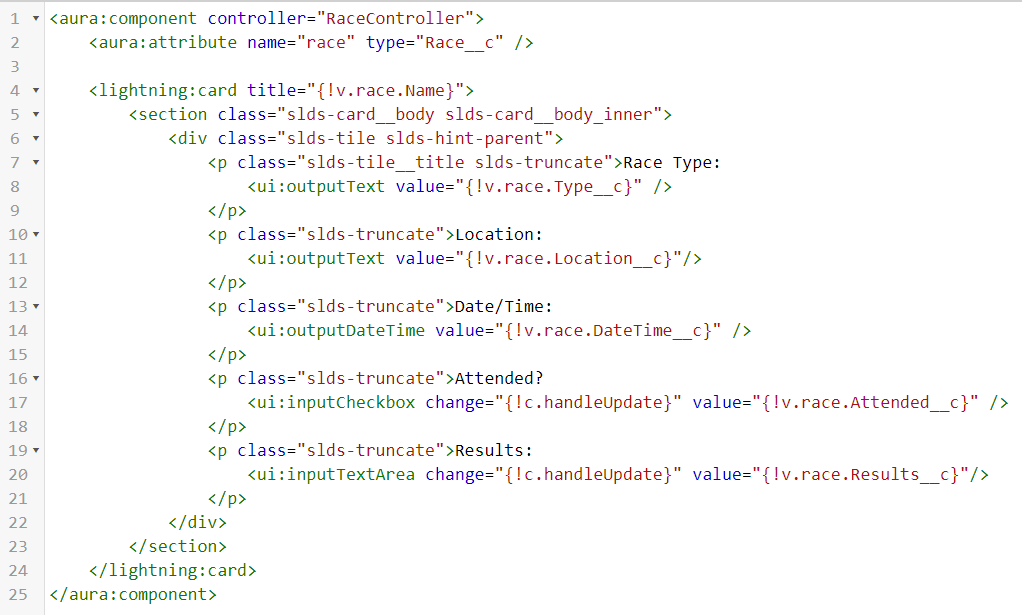
EDIT: Below is the requested markup and code for the inner RaceV2 component, which actually includes the individual race data.

First, the Markup:

RaceV2Markup.png

And now the Helper Resource:

({
	updateRace :function(component) {
        var race = component.get("v.race");
        console.log("Calling updateRace");
        var action = component.get("c.updateRaceDB");
        action.setParams({ "race" : race });
        action.setCallback(this, function(response) {
            var state = response.getState();
            if (component.isValid() && state === "SUCCESS") {
                console.log("Race successfully updated");
            } else if (state === "ERROR") {
                var errors = response.getError();
                if (errors) {
                    if (errors[0] && errors[0].message) {
                        console.log("Error message: " + errors[0].message);
                    }
                } else {
                    console.log("Unknown error");
                }
            } else {
                console.log("Action State returned was: " + state);
            }

        });
        $A.enqueueAction(action);


    }
})

If you found this article useful, you might want to checkout my latest course on Pluralsight titled, Lightning Component Development Best Practices, where I talk about pagination and a lot more.

Natural Language Processing for JavaScript…Seriously

nlp.pngI would highly recommend anyone interested at all in Natural Language Processing (NLP) check out this newly released free course from the great folks at EggHead.io titled, “Natural Language Processing in Node.js“.

This short, but sweet course by programmer/artist Hannah Davis is based on work she did on a project to translate literature into music. The project, named TransProse would read in text using the natural library, which is available as open source here.

Hannah’s course gets straight to the point and shows you very quickly how you can start parsing text using the natural library and then do all sorts of things with it such as locating similar words, tagging parts of speech, and even classifying text into categories with machine learning.

The entire course takes only 38 minutes to watch. 

Come on. You can take the time to watch it.

But hurry, because it is only free until December 19th, as part of several courses Egghead.io is relasing for it’s 10 days of Giftmas.


What’s hot in tech? Reviewing the latest ThoughtWorks Radar

Great reference to a website that helps you stay current in this crazy moving fast industry.

Richard Seroter's avatarRichard Seroter's Architecture Musings

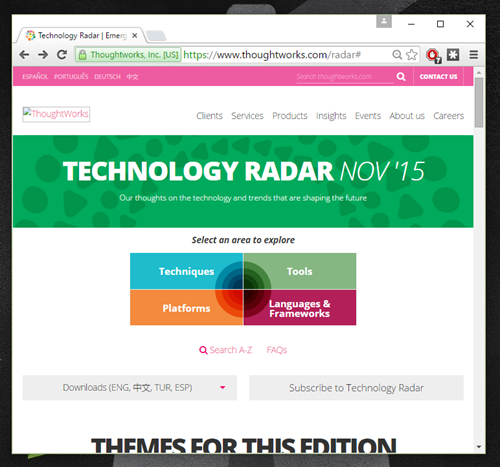
I don’t know how you all keep up with technology nowadays. Has there ever been such a rapid rate of change in fundamental areas? To stay current, one can attend the occasional conference, stay glued to Twitter, or voraciously follow tech sites like The New Stack, InfoQ, and ReadWrite. If you’re overwhelmed with all that’s happening and don’t know what to do, you should check out the twice-yearly ThoughtWorks RadarIn this post, I’ll take a quick walk through some of the highlights.

2015.11.22radar01

The Radar looks at trends in Technologies, Platforms, Tools, and Languages/Frameworks. For each focus area, they categorize things as “adopt”  (use it now), “trial” (try it and make sure it’s a fit for your org), “assess” (explore to understand the impact), and “hold” (don’t touch with a ten foot pole – just kidding).

ThoughtWorks has a pretty good track record of trend spotting…

View original post 710 more words