Why Lightning Base Components are so Awesome

When Lightning development was first introduced, the Salesforce developers thought UI components (which you have probably seen used in a lot of sample code) would meet all the needs of component developers. They were wrong. Although the UI components, which include things like ui:inputText/ui:outputText, ui:button, ui:menu, ui:message are very useful, they have some serious drawbacks.

The biggest drawback is that they do not handle validation for you automatically. The component developer is responsible for adding JavaScript code needed to validate data entered into these components. Another big drawback with UI components is that they do not handle Salesforce Lightning Design System (SLDS) styling for you. You have to know which SLDS tags to use around your UI components.

To understand exactly what this means, consider a “very simple” component used only for creating new cases. This is what the component looks like when rendered:
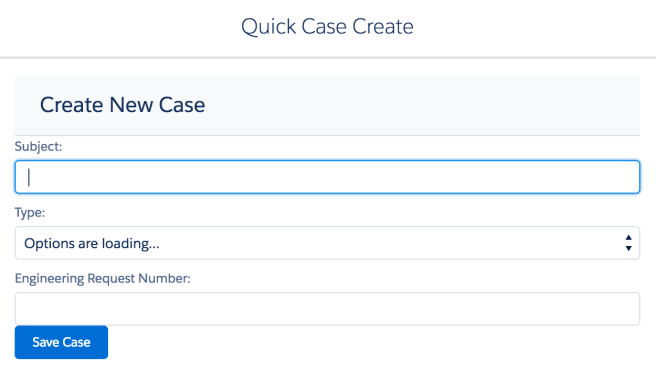
Screen Shot 2017-03-03 at 2.51.39 PM.png

Using UI components, this is how much code is needed to validate this very simple component:

validateForm: function(component) {
  var validCase = true;
  var subjectField = component.find("Subject");
  if($A.util.isEmpty(subjectField.get("v.value"))) {
     validCase = false;
     subjectField.set("v.errors", [{message:"Subject can't be blank"}]);
   }
   else {
     subjectField.set("v.errors", null);
   }
   var reqNumberField = component.find("EngineeringReqNumber");
   if($A.util.isEmpty(reqNumberField.get("v.value"))) {
     validCase = false;
     reqNumberField.set("v.errors", [{message:"EngineeringReqNumber can't be blank"}]);
   }
   else {
     reqNumberField.set("v.errors", null);
   }
  // Verify we have a contact to attach it to
   var contact = component.get("v.contact");
   if($A.util.isEmpty(contact)) {
     validCase = false;
     console.log("Quick action context doesn't have a valid contact.");
   }
   return(validCase);
 }

In addition to having to add your own validation code to the JavaScript controller, you will have to know which SLDS (or Salesforce Lightning Design System) tags to use and this is not always so obvious.

Most developers I know do not want to have to spend the time learning which CSS tags to apply to get the styling they need. They just want things to work. Out of the box. Simple like.

I hear ya and so did the developers at Salesforce.

In Winter 17, Salesforce released a whole new set of components known as Base Lightning Components. Similar to the UI components, these components do something fundamentally different. The validation code and SLDS styling is built right in. All you have to do is add the markup to your page and waaaalaaa!

The page will render the same with styling and will have built-in validation, but the code will be so much simpler.

If you have not checked out the Base Lightning Components, you might also want to check out my new course on Pluralsight, which has an entire module about Base Lightning Components.


Top 5 Lightning Tips for Visualforce Devs

#1- Transition does not have to be all or nothing

For Visualforce Developers, when it comes to transitioning to Lightning development, it does not have to be an all or nothing deal. Very few development shops/companies will go from doing all Visualforce development to doing all Lightning development overnight. That is just not realistic, nor a good idea, in my opinion.

The introduction of Lightning Out offered a lot of options for Visualforce developers wanting to slowly transition to Lightning. If you want to learn what options are available in terms of a transition plan, I suggest checking out this post and blog series by Salesforce Architect, Mike Topalovich. Mike does an excellent job, not only of giving a lot of background, but of detailing 5 specific migration paths that you will want to consider.

#2 – Watch your Casing

JavaScript is Case sensitive!!!

This is so important, I am going to write it again, “JAVASCRIPT IS CASE SENSITIVE”.

If only I had a nickle for every time I ended up discovering that the odd error I was getting in Lightning was actually caused by a casing error of mine. Seriously, I cannot tell you how many times this has tripped me up. More times than I would probably like to admit.

So anytime you are working with Lightning and you get an error that makes no sense, the first thing you should do is return to your JavaScript code and make sure you did not make a casing error. It really is VERY easy to do. Embarrassingly so.

#3- Security Works Differently

As Visualforce developers, you have been spoiled as far as security is concerned. Visualforce apps operate out of the Force.com domain, which is not shared with Salesforce code. But, Lightning apps and components run in a special domain that is shared with Salesforce-authored Lightning code.

This means that the security for Lightning components are subject to a Content Security Policy (CSP). The rules surrounding what is and what is not allowed with these components will just tighten as time goes on. Go here to learn more about all the concerns regarding Lightning Security.

One important thing that you need to know is that any of your AuraEnabled Apex classes must do an explicit check for CRUD and FLS permissions. This was handled automatically for you in Visualforce pages, but in Lightning, unless you are using the new Lightning Data Service, you will need to do this check manually. You can do so using the isAccessible(), isCreateable(), isDeleteable(), and isUpdateable() methods. You can learn more about how this is done here.

#4 – Install and Use the Lightning Inspector

For Chrome users, there is an excellent plug-in called Lightning Inspector that every Lightning developer should check out. One of the most useful features it offers is a component tree tab, which shows you how the Lightning Framework sees your component. You can use this as a tool not only for debugging components, but learning more about what some of the built-in ones are capable of.

#5 – Check out newest components/features added

The Lightning Framework has been out for a while now (over 2 years actually) and in that time there have been many new releases and lots of new features added. Building Lightning components today is not the same as it was when you may have run through a tutorial or article a year or two ago. If it has been a while since you took a look at what features and components are available, it is time to take another look.

In the last release (Winter 17) many new features were added such as the Lightning Data Service, which you can kind of think of as the equivalent of a Standard Controller for a Visualforce page. Currently this feature is still in developer preview, but using it allows you to eliminate the need for Apex code and also those manual security checks that I mentioned earlier.

I strongly believe that component-based development, such as what you do with the Lightning Framework is the future of web and device-based development. If you have not already dipped your toes in Lightning Development, it is not too late. Things are just getting really good for this modern development platform.

AI for Everyone? Kind of

Recently, Salesforce started a campaign concerning their latest product offering, Einstein. This einsteinplane1campaign promises, “AI for Everyone”.

That is quite a claim and Salesforce is certainly not the first to make it. As a self-proclaimed AI Enthusiast/junkie, I can say that I have seen this type of claim before. However, this is the first time that I think it might actually be somewhat possible. At least as far as a specific area of AI known as deep learning is concerned. And, also if were talking about relating this just to Salesforce in particular.

So, does this mean that soon everyone will have personal robot butlers?

Absolutely not. We are not even beginning to talk about robotics here. Nor some other areas that fall under the rather large AI umbrella.

So what can Salesforce customers do with Einstein?

Well that will certainly change as the product evolves, but right now the most relevant thing you can do with it is to utilize the Predictive Vision Service (PVS). This can be used to classify images into categories using supervised learning and very specifically optimized machine learning algorithms. These algorithms were developed by a company called MetaMind, which was last year aquired by Salesforce and since then they have been working feverishly to offer their services on the Force.com platform.

If you are interested in learning more about how this works, check out the docs here or this recently released webinar, which does a very good job of laying out what is currently possible with the PVS.

Note that currently Salesforce is not offering a service that does Natural Language Processing (NLP).  But, I am sure that will be the next big thing Salesforce customers will be demanding. NLP is a huge field and one that has been around for many years, but with varying levels of success.  The most difficult challenge I suspect will come from the fact that the product will need to support several languages beyond English to be considered useful. It will also need to be able to handle untrained users with a high degree of accuracy, which is a very tall order to fill.

It appears to me that the majority of Einstein’s capabilities will be “Baked in” to many of Salesforce’s products and their use should be seamless to users. They will also be very specific to Salesforce CRM.

The most important thing to understand is that Einstein is NOT a general purpose AI engine. As enthusiastic as the Salesforce Marketing team obviously is, Salesforce has not reinvented the wheel and certainly not developed some new and unheard form of AI that will corner the market.

BUT, they have started to offer some very useful API’s that can be used to implement specific areas of AI that were once only accessible to the elite of AI researchers.

And the most promising news was just announced this month when a group from Salesforce Research created a neural network named the Dynamic Coattention Network and that model was the first to break the 80% mark when tested against the Stanford Question Answering Dataset. And for those of you that just said to yourselves, “and why should I care about that?”.

Well, ever since Stanford released their dataset, which now consists of questions posed by crowdworkers on a set of Wikipedia articles, lots of top AI researchers (including Microsoft, Google and IBM) have been racing to create models that will reach this golden threshold, but Salesforce was the first to reach it. It’s kind of a big deal.

I look forward to the next few years and seeing all the new services that will be added to the platform, bringing about the Enhanced Computing world I always envisioned.

Winter 17: Replacing JavaScript Buttons With Lightning Actions

Winter 17 hasJS introduced a whole bunch of new enhancements for Lightning and I will be blogging about a lot of them in the next few weeks, but one of my favorites is the new Lightning Actions that provide the ability to replace all those JavaScript buttons you may have littered about your org.

Ok, now anyone that has an org with more than one JavaScript button, just read that last statementdreamstime_xl_25648715 and probably thought, “Say what? I have to replace JavaScript buttons with something new? What about just migrating the existing buttons to Lightning?”

Can’t do it.

Why? Well, in three words, “Big Security Concerns

Yep. the kind that can bring an org to it’s knees and one that also can’t be resolved by providing some simple migration tool that converts existing buttons into Lightning actions automagically.

The bad news here is that you are going to have to do some real work to get all those buttons converted into Lightning actions. But, the good news is that once you do it, you will probably be very happy that you did and your org will certainly be more secure as a result.

And to help you get to that point, the Salesforce development group has started a new blog series titled, “JavaScript Buttons, Lightning and You“. This three part series will step you through what you need to know to move towards Lightning Actions. I also plan to cover this very topic as part of the new Lightning course I am working on (more on that later).

So, take some time to check out the new blog series and learn why you might be better off starting your transition to Lightning by first converting all those buttons to actions.

And stay tuned for more info about my upcoming Pluralsight course.


The Next Generation of Programmers, Listen Up!

Want to know what you need to know to be ahead of the curve in the world of Software Development?

Look no further than the following YouTube video, which was recorded during last years Dreamforce. It was a talk about “Modern Architectures: Above the Platform, Beyond the App” and it details all the things YOU (the next generation of programmer) needs to know to be successful in the new generation of app development.

Unfortunately, as of today, it has only been viewed 145 times and yet should have been PeterCoffeeSalesforceDotCom_sq300-269x200viewed 145 million times. In this video, Peter Coffee, the VP of Strategic Research at Salesforce is going to give you a message that you really need to hear.

I hope you take the time out of your day to hear his message. It is a VERY important one. Make sure you make it to the 26 minute mark when he says that, “We need to go further and provide an experience y recomposing what we used to call apps. We need to write code that intuits desire from behaviour, learns history and applies it predictively…”


Apply .NET Skills to Salesforce

NETTrailReleased yesterday is a new trail titled, “Apply .NET Skills to Salesforce” and it is all about wooing more .NET developers to the Salesforce platform, which I am of course, all for.
This FREE and most excellent resource is written by a .NET developer for .NET developers. It does not sugar coat anything about the platform, but instead tells .NET developers honestly and directly what the platform offers and how their existing .NET skills can allow them to transition easily to Force.com. It also points out a lot of the common pitfalls they will want to avoid to be successful on the platform.

It consists of two modules. The first is all about SOQL and database basics and it has the following 4 units:

  • Moving from SQL to SOQL
  • Writing SOSL queries
  • Writing Efficient Queries
  • Manipulating Records with DML

The second module (which is my absolute favorite), it all about Apex and the Force.com platform and it has the following units:

  • Mapping .NET concepts to Force.com
  • Understanding Execution Context
  • Using Asynchronous Apex
  • Debugging and Running Diagnostics

I hope you check them out, as well as the Salesforce platform, which is growing more impressive by the day. And please let me know what you think.

What Ever Happened to Enhanced Computing?

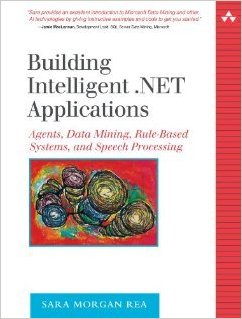
FirstBookIt is hard to believe, but it has been 11 years since my first book,Building Intelligent .NET Applications: Agents, Data Mining, Rule-Based Systems, and Speech Processing was released.

In that book I introduced the term “Enhanced Computing”, to identify software programs that utilize AI-based technologies to improve and extend traditional line of business applications. This was actually the whole premise of my book. Unfortunately, the term Enhanced Computing never really caught on, but a lot of the technologies I wrote about in that book have continued to advance and show great potential to dominate the technological landscape of tomorrow.

One thing I found interesting is that in my book I also wrote about something called the “AI Effect“, in which people observed that once a technology becomes widely accepted it is no longer associated with AI. Most recently there has been an explosion in the media concerning IOT (Internet of Things) and machine learning. Both of these concepts are firmly grounded in AI, yet you rarely see AI mentioned when referencing them. AI Effect? Must be, I think.

I was very excited to see this article about What’s Next in Computing?, in which the author goes into great detail about how we are poised for another technological revolution in which he predicts that we may have finally entered the golden age of AI.At the forefront of that is machine learning (or Data Mining as I refered to it 11 years ago).

Machine Learning and the use of Neural Networks has long been of great interest to me so I was particularly pleased to see this recent article, The cloud is finally making machine learning practical. Even though the article focused on machine learning using Amazon Web Services algorithm’s and Microsoft’s Azure machine-learning service, I see no reason why the same things could not happen on the Salesforce platform.

After all, with the recent release from Yahoo of their News Feed dataset, which is a sample of anonymized user interactions in the news feeds and is over 1.5 TB (that’s right, Terabytes) in size, all sorts of things may be possible for researchers independently exploring deep learning techniques. Especially those fueled by the cloud (hint, hint, wink, wink).

There have also been many advances in image recognition, due to other advances in deep learning, which have suddenly thrust AI more into the mainstream. In this recent article on Why 2015 was a Breakthrough Year in Artificial Intelligence, a Google researcher states, “Computers used to not be able to see very well, and now they’re starting to open their eyes.”

In fact, just this week Mastercard announced it is offering a new security app that allows people to take a selfie in order to confirm their identity. It is called, “Selfie Pay”. Way Cool!!! I am pretty sure that one is going to take off soon.

EDIT on 2/29/16: And then, there was this announcement several days after I wrote this post that Salesforce acquires Machine-learning Startup PredictionIO. I am sure they just read my post and the hint, hint, wink, wink part and that is why they purchased them (LOL) Just Kidding, but talk about timing, eh?

So, here’s to the future of <whatever it might be called next>!!!


Who-hoo – The new Apex Interactive Debugger is finally here!!!

UPDATE on 3/1/2017: If you are interested in learning more about the Debugger, check out this Developers Relations Post. I would also suggest you check out this very interesting StackExchange Post, in which someone who has actually used the Debugger chimed in. FYI: It costs about $18,000/year.

Any Salesforce developer that has migrated from another language (especially .NET) knows that the debugging capabilities in Force.com are…ummm, how shall I put it?

They suck! Yeah, that’s it.

Well, guess what? As of Winter 16, Salesforce is offering a new Apex Interactive Debugger that will finally make developers of other platforms feel right at home.

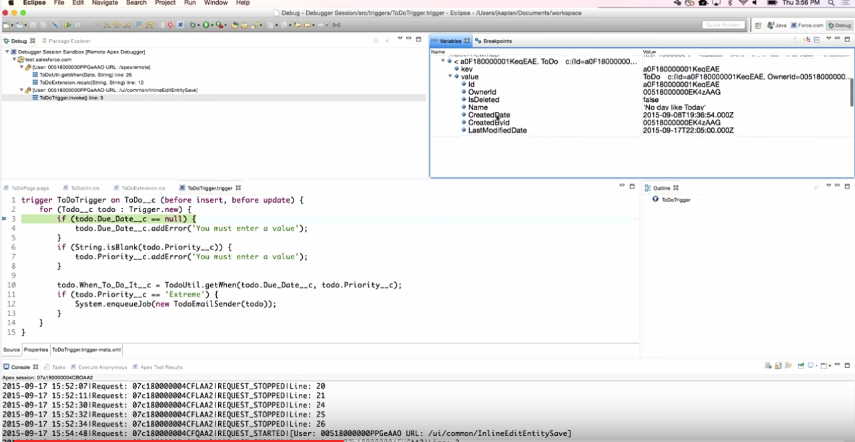
I am talking about an interactive debugger that allows you to set, remove and suspend breakpoints. It also allows you to step in, step out, step over and through your code, as well as view variables at any point in the stack and also output System.debug statements to the console window.

This new interactive debugger is being offered as an eclipse plug-in (see image below).

ApexDebugger

Now, I must offer full disclosure right up front and tell you that there is one really big gotcha with this announcement and that is this:

It’s going to cost you. As in money. I would imagine a good amount of it too (although you will have to contact your Account Executive to find out exactly how much). Supposedly you can purchase debugger sessions that can be shared by your whole development team.

But why? Salesforce has always offered development tools for free.

The big reason for this cost is not because Salesforce is trying to make a lot of money off customers. It is to effectively limit the use of the tool. Because Salesforce is a multi-tenanted environment and resources are shared, if every customer all of a sudden was granted access to the new Apex Interactive Debugger, guess what would happen?

Crash!!!! as in all the servers lock up and no one is happy.

The Interactive debugger uses a debugger session manager and every debugging session is a transaction that can last up to 30 minutes. Each transaction needs a thread and a database connection. These are very expensive resources and in a shared environment, if every customer was able to do this, performance problems would quickly result.

Another thing to note is that the debugger uses the debugging API and at this time, that API is not publically available. This means that you will not find this kind of functionality offered in any third-party tools, such as MavensMate. Once Salesforce works out the kinks, they will likely release it publically, but in the meantime, the eclipse plug-in is the only way to go.

Also, for obvious reasons, this will only work on Sandbox orgs.

If you are a partner or a big development shop (now I am starting to wish I was one of those), then these limitations and the cost will likely not offset the benefit to having this super new tool. If you are interested in learning more, check out this Dreamforce video in which Josh Kaplan walks you through using the new debugger.

Happy debugging!!!!

UPDATE on 3/1/2017: If you are interested in learning more about the Debugger, check out this Developers Relations Post. I would also suggest you check out this very interesting StackExchange Post, in which someone who has actually used the Debugger chimed in. FYI: It costs about $18,000/year.

Book Review of “The Silent Intelligence: The Internet of Things”

SilentIntelligenceI recently had the pleasure of reading, “The Silent Intelligence: The Internet of Things”. This book was written by two machine to machine (M2M) experts who incorporated their own hard earned experiences along with the opinions of over thirty industry experts.

If you are on the fence about the Internet of Things (IOT) and not sure if this is just some trendy fad, then this is the book for you. It will definitely make you a believer and get you excited and slightly prepared for all the good stuff to come.

And if you are a Salesforce developer, have no fear, you have the right skills to capitalize on this soon to explode market. The cloud, and in particular the Force.com platform is in the perfect position to handle and benefit from all the data that will be streaming in from these devices. As Steve Pazol, of nPhase and Qualcomm says:

“At the end of the day, M2M is really about data. You’re getting data off devices or sensors that have been hard to get, but once it’s in the cloud, it’d data. So all the data tools, if it’s big data or any kind of business intelligence software, all that stuff is applicable”.

After reading that you should definitely be thinking about Wave and all that will be possible once all that IOT data makes it to the Force.com platform.

Ok, so once you read this and decide that you undoubtedly want to learn more, check out Pat Patterson and Reid Carlberg’s excellent posts on DeveloperForce about IOT and the Force.com platform specifically. Have fun!!!

Force.com Canvas and .NET Considerations

Introduced in Winter 2013, Force.com Canvas offers a way to host non-native (aka, non-force.com) web applications within Salesforce. Using a signed request, applications developed with your language of choice (including .NET) can connect to Salesforce and access data without requiring the authenticated Salesforce user to also log in to your web application.

I really like this technology because it opens up lots of opportunities for developers and allows shops with little Force.com experience another option. However, that does not mean that using it is all sunshine and butterflies. For one, it is very new and so there is not a lot of documentation out there (especially about .NET). The official developers guide is focused more towards Java developers, yet there are some very specific considerations that need to be made when working in the .NET environment. I recently had the opportunity to convert a Java Canvas app to an MVC Canvas app and this article highlights some of the main considerations you need to make when working in that environment.

MVC Project must use No Authentication

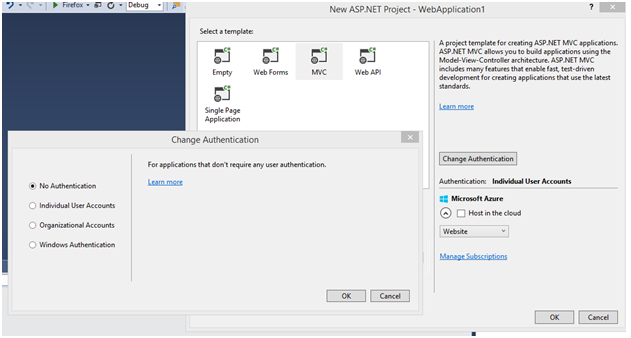
If you are creating a new MVC app, you will need to click “Change Authentication” when creating the project and select “No Authentication” (see NewMVCprojectImage). This will mean that the authentication scaffolding that ASP.NET adds to the project will not be included. I was not able to make a canvas app work with this scaffolding included. Perhaps, it can be done, but the only way I could make it work was to create a new project without the authentication (which makes sense since the authentication is being handled by the signed request and Force.com Canvas).

Must set SSL Enabled Property to True

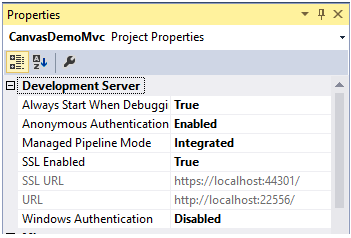
Regardless of whether an ASP.NET Web forms or MVC application is used, you will need to set the site binding as HTTPS by setting the SSL Enabled property to True. You will also need to ensure that the Managed Pipeline Mode is set as Integrated. These properties can be CanvasMVCPropertiesaccessed by right-clicking the project in Solution Explorer and looking at the properties in the Properties window(see image). Also, note here that the SSL URL is the one you will want to use as the Canvas App URL when setting up the Connected App in Salesforce.

May want to consider using the following GitHub project to do handle the Server-side Authentication

In my project, I created a couple of class files to handle the server side validation of the signed request token passed in from Salesforce. However, to make your life easier and speed your time to development, you may want to consider downloading and using the following GitHub code to do the verification part. I did not find this code until after I had written mine and I thought mine was more streamlined, so I opted to go with it instead. But, looking at Shawn Blanchard’s code could give you a HUGE head start. If you don’t like that example, then you can check out the code that Paul Short posted here. It shows how to do the verification part for both a web form app and an MVC app.