Need Help Converting Your Classic JavaScript Buttons to Quick Actions?

In last weeks Lightning Keynote for TrailheaDX, Eric Jacobsen told everyone that an analysis done by his group showed that there are over 2 Million Javascript buttons in Salesforce Classic today.

WOW!!! That’s a lot of buttons that still need to be converted to Lightning Quick Actions.

This has been a not so fun task lingering over many Salesforce developer heads for quite some time. I imagine this one issue has been the main reason many Salesforce orgs have been hesitant to fully adopt Lightning.

So now my question to you is, “Do you think you need help converting your JavaScript buttons to Quick Actions?”

If you answered yes, then the good news is that the help is coming. Eric announced in that very same keynote that a new tool called the Lightning Configuration Converter will be available in late Spring 18.

The new tool will help you to identify those JS buttons that you still need to convert and then for some of them, will give you a simple way to convert them by using a single click. Yep! A single click!!!

Screen Shot 2018-04-08 at 5.15.28 PM

So that was the good news and now here is the bad news.  The bad news is that the tool is not quite available yet and even when it is, they are estimating that it will only convert about 20% of your buttons at first. But, it sounds like that number will possibly go up as time goes on. And let’s face it, 20% is still a lot better than 0%. So, I still think this a huge win for the Salesforce development community.

And here is some more good news. Right now what is available is a GitHub repo that contains 9 examples of commonly used JavaScript buttons and the code needed to convert those to Lightning Quick Actions. This covers some of the most common and sometimes complex scenarios where JS buttons are used, such as:

  • Showing a Dialogue
  • Redirecting to a URL conditionally
  • Performing Mass Updates

So check out the repo and wait for more news about the release of the new Lightning Configuration Converter.

Happy Converting…

Come Check out Managing Application State with SPA’s at TDX18

I am very honored to be participating as a panelist asking questions about Managing Application State with SPA’s. The session will be on Thursday, March 29, 2018 from 1-3:00 pm and is titled, “The Extracurricular: “Why Did That Do That?” Managing Application State w/ SPAs”.

It is a really cool format and one I think will be very fun and interactive (with lots of audience participation), so if you have any interest in this topic, I highly encourage you to attend. The main speaker is the incredible Matt Lacey and he will be talking about the challenges he has faced building a Visualforce application that used VF Remoting and React + Redux to manage application state.

The best part of this is it is not just your typical session in which the speaker just tells you a bunch of stuff and shows a bunch of boring slides. Not, this one is special. It will involve Matt briefly telling and showing us his app and then the rest of the time will be a very interactive discussion about managing application state that will involve not only the panelists and myself, but you the audience member as well. How super cool is that?

Ok, so if you are going to TDX18 and have some time on Thursday, please stop by.

And also be sure to check out Camp Quick Start  (that is where I will be most of the time), as well as the new and incredibly fun Robotics Ridge.

See you there…

Goodbye Force.com IDE Beta…Hello Visual Studio Code

Back in 2016, I wrote a post here about how the Force.com IDE was making an epic comeback, with support for Lightning.  At the time I was very excited to see that Salesforce was refocusing it’s efforts towards improving that tool in the form of a Beta. Even though the Force.com IDE was the original tool that Salesforce offered and it had a long history with the development community, it had failed to keep up with the bevy of tools now being offered by third-parties.

Fast forward to today and the recent announcement by Salesforce that the Force.com IDE Beta has been officially discontinued.

So where does that leave Salesforce developers?

Well, not as bad as you might think. Salesforce is not giving up on supporting a local IDE. Nor are they giving up on the original version of the Force.com IDE (at least not just yet). So far, only the new Beta will be discontinued.

It is just that they are focusing their efforts towards improvement of the Salesforce Extensions for Visual Studio (VS) Code. It just made no sense to support two tools and after analyzing feedback from the Beta of the Force.com IDE, the team had to make a clear choice and Salesforce Extensions for VS Code came up the winner.

I personally prefer Visual Studio Code and there is no question that it is easier to install than Eclipse (which was always a bit of a nightmare imho with all the required Java installs it required). I also like how intuitive it is and that I can use it to do all sorts of other modern development. If there is a popular modern language out there, you can safely bet that VS Code supports it.

If you have not had a chance to check it out yet, I highly suggest you do so and just remember to keep an open mind.

Also, be aware that Salesforce Extensions for VS Code does not yet support everything that the Force.com IDE does. Like I said earlier, the original Force.com IDE is not going away, just the newer Beta version which included support for Salesforce DX and Lightning. It is going to take some time for the development team to get all the features that the Force.com IDE offers into Salesforce Extensions for VS Code.

But keep in mind, that VS Code is where they are headed, so if you have not yet checked out Visual Studio Code, now is the perfect time to do so. I think you will be pleasantly surprised and impressed with it.

And let me know what you think…

Why you should be using the Lightning Data Service whenever possible

If you are creating Lightning components and working with a single record of data, you should be using the Lightning Data Service (LDS) or the force:recordData tag.

And for those of you that have not heard about the LDS, you can think of it as the standard controller for lightning components. It is similar to the standard controller used in Visualforce in that it gets you access to your orgs data, but without the need to write any Apex or SOQL and that is a pretty cool thing because when you don’t have to worry about writing Apex, you also do not have to worry about FLS or Field Level Security and CRUD or Create Access Update and Delete security, which is something you would have to specifically check for in your code if you did not use the Lightning Data Service.

You see I have to tell you that all of you Visualforce developers have been a bit spoiled when it comes to security, b/c in most cases, the pages that you wrote did not have to specifically check for these permissions (even when they used controllers). But, the Lightning Platform works very differently than Visualforce and any Apex code you write does have to do these checks, which involves writing more code.

With the Lightning Data Service, you also get other built-in features like auto-notifications when there are record changes, as well as offline access for Salesforce1.

And if all that was not enough to convince you that Lightning Data Service is something you want to use, here is one more really big reason. Even if you have multiple components using the Lightning Data Service, they are all going to use a single request and deal with a cached response and in terms of performance this is huge.

Even if you have multiple components using the Lightning Data Service, they are all going to use a single request and deal with a cached response

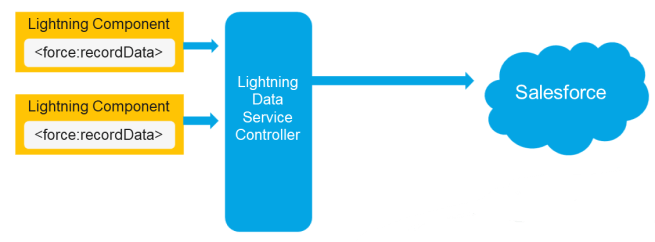
So let’s talk about that a bit more. Let’s say you have two components that are using the force:recordData tag. Each one will make a request for data through the Lightning Data Service Controller, and those requests will be funneled into one single request which is sent to the Salesforce server, such as you see here.

LDSDemo2

But what is returned is a response that will be stored in a shared data cache and also returned back to the two components that started all this, such as in the diagram below. And this means that not only will those two components be able to retrieve the data faster than two components that were using their own apex controllers

LDSDemo3

But if a third component that needed that same data were to come along, it would be able to get a cached response almost immediately without even having to make a call to the server. Boom!

LDSDemo4

And the beauty of it all is that you can implement this with just a few lines of markup code in the component and then a few more lines in the JavaScript controller to load and save the record. You do not have to write any Apex or SOQL code to implement this, but you get all the performance benefits.

So now do you see why you need to be using the Lightning Data Service whenever possible?

If you found this article useful, you might want to checkout my latest course on Pluralsight titled, Lightning Component Development Best Practices, where I talk about the Lightning Data Service and a lot more.


Check Out Lightning Component Development Best Practices on Pluralsight

DevBestPractices

I am so happy to announce that my third course about Lightning Component Development Best Practices was published on Pluralsight last night.

I worked extra hard on this course and have spent every weekend for the past 6 months toiling over every little thing I included. I am really hoping that effort shows through and I would love to hear your feedback (good or bad). All feedback is welcome. The good stuff makes me feel good and the bad stuff makes me better, so it’s all good.

Here is the description for the course and a listing of the specific things it covers:

Are your Lightning Components performing at the best level they can? Are they secure? Will they scale well as you start to build more complex Lightning Applications? In this course, Lightning Component Development Best Practices, you’ll learn the answers to these questions and more. First, you’ll find out what simple best practices you can incorporate to improve client-side rendering. Next, you’ll learn how to enhance server-side efficiency. Finally, you’ll discover what you can do to ensure your components are secure. When you are finished with this course, you’ll have the confidence to build Lightning Components that run “Lightning Fast”.

Modules:

  • Improving Client-Side Performance
  • Enhancing Efficiency on the Server
  • Reusing Code in Complex Applications
  • Avoiding the Pitfalls of Inter-Component Communication
  • Enforcing Security and Mistakes to Next Make


5 Ways to Build Lightning Fast Components

This post is based on a talk I gave twice at this years Dreamforce.

The five tips I cover here were hand picked by me out of a whole bunch of stuff I discovered while creating my latest Pluralsight course about Lightning Best Practices. The course will be released soon, so stay tuned and I will let you know. All of these tips are pretty simple to implement and I think they represent the quickest and easiest things you can do to get better performance.

So, in David Letterman style. here they are from last to first:

# 5 – Check your Settings

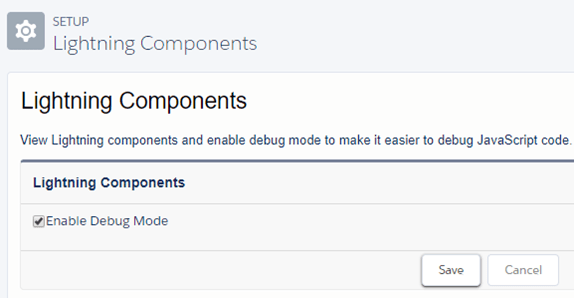
Specifically, you want to check the values for debug mode and component caching, which should have different values depending on whether you are in production versus development.

Debug Mode

Debug mode is what you can toggle to allow detailed debug messages to appear in your browsers console log and these messages can really help you not only to debug your components, but as you will learn about soon, they feature important messages about performance.

For the debug mode, you want that to be enabled in development, so you can get those messages you need as you are developing, but in production, you want to make sure this is turned off b/c when it is enabled, it means that all the css and javascript that is downloaded to the client is not minified, which means it will take longer to download and longer for your components to render and that is why you do not want it enabled in production.
DebugMode

Component Caching

Component caching has to do with whether pages will be cached to specifically improve performance, which is why that one is so important.

For the component caching, the settings should be the opposite and you want caching disabled in development, because while you are making changes to components and testing how they render, you do not want to have to hit your browser refresh several times before you see your changes which is what will happen if it is enabled. But, in production, where changes to the code are not happening, you want to make sure caching is enabled, since this will result in faster component rendering.

ComponentCaching

# 4 – Use <aura:if> for Conditional Rendering

To do conditional rendering in Lightning, you could use a technique known as css toggling and for a long time this was actually the way even Salesforce recommended you do toggling in the official docs. But in fact, what we now know is that you do not want to do this and the reason why is that when you use this method, any components inside the css toggled code (and most importantly any event handlers associated with those components) are rendered right away.

The alternative is to use the aura:if tag. Using this means that anything inside the aura:if will not actually be rendered until the condition is true. So in the example below, the event handlers associated with the lightning button will not be active until the aura:if condition is true.

<aura:if isTrue="{!v.isVisible}">
             <lightning:button label="Submit"
            onclick="{!c.newRecord}" />
 </aura:if>

# 3 – Check your Console Log

The number 3 tip is a reminder to always check your browsers console log because not only can you use this for debugging your components, but the lightning development team now will push performance warning messages to the console log and so even if your component is rendering fine and doing everything you want it to, you could have a performance issue and not even be aware of it.

PerformanceWarnings.png

You can access the Console log for the Google Chrome browser by right-clicking inside the browser and selecting Inspect. But know that these messages will only appear when debug mode has been enabled, so this is something you want to only check for in your development org.

# 2 – Use the Lightning Data Service whenever possible

The Lightning Data Service is just way cool and offers a whole bunch of great features. If you do not know about it, check out this great Trailhead that tells you all about how to use it.

The best thing about the Lightning Data Service (or <force:recordData> tag) is that it provides a single cached response and this can have a big impact on performance.

Let’s say you have three components that are all using the force:recordData tag. Each one will make a request for data through the Lightning Data Service Controller, and those requests will be funneled into one single request which is sent to the Salesforce server.

But what is returned is a response that will be stored in a shared data cache and also returned back to the two components that started all this. And this means that not only will those two components be able to retrieve the data faster than two components that were using their own apex controllers.

And if a third component that needed that same data were to come along, it would be able to get a cached response almost immediately without even having to make a call to the server. Boom!

LDS2

# 1 – Use Storable Actions whenever possible

So here we are at the number one tip and it is to use storable actions whenever possible, which essentially allows you to take advantage of caching and get all the benefits that you just saw demonstrated, even when you are not using the Lightning Data Service.

And a good example of this can be seen with a component that needs to access a list of data (which is something that the Lightning Data Service currently cannot handle, since it only works with a single record).

When paging through a list of records that use storable actions, after the pages are rendered once, the next time they are returned to, the rendering will happen in a fraction of the original rendering time. This can results in significant performance savings when a user needs to page through a long list of records.

And to take advantage of caching, all you have to do is add a single line of code right after you define the action, such as in the following example:

​var action = component.get('c.getRacesDB');
​action.setStorable();
​action.setCallback(this, function(response) {
​            // Code here to handle the response
​}
​$A.enqueueAction(action);

If you found this article useful, you might want to checkout my latest course on Pluralsight titled, Lightning Component Development Best Practices, where I talk about base lightning components and a lot more.

Come see my Dreamforce talk about Lightning Fast Components

If you are attending this year’s Dreamforce, I would love for you to come see me talk about the 5 Ways to Build Lightning Fast Components.  The 5 tips I am presenting are the best ones I learned while doing the research for my upcoming Pluralsight course called, Lightning Component Development Best Practices.

Here are the details for the Dreamforce talk:

  • When: Thursday, November 9th (10:15 AM – 10:35 AM)
  • Where: Moscone West, Developer Theatre

This is my third time to speak at Dreamforce and it will be especially memorable this year as it is also going to be my first week as a Salesforce employee. Yep, if you haven’t heard, I am joining the Ohana and specifically, the amazing Trailhead team.

So please stop by and be sure to say hello…

SFDreamforce2017.jpg


New Dream Job at Salesforce

THLogoI have very exciting news to share. The first day of Dreamforce will also be my first day as a member of the Trailhead team. I have accepted a job as a Technical Curriculum Engineer.

Doesn’t that just sound cool?

And the best part is that I will be working for the legendary, Jeff Douglas!!! Yep, that guy. The one and only. I bet you are way jealous now.

The thing that I love so much about Trailhead is the quality of the content they produce. I truly believe they are leading the way in terms of how to produce effective technical instructional material and I am just thrilled to be a part of it.

The thing I am most passionate about in life is the process of taking something that is very complex and difficult and presenting it in a way that is easily understandable to almost anyone. It is kind of like the ultimate crossword puzzle (and yes, I happen to love crossword puzzles).

As far as this blog and my courses at Pluralsight, we will have to see how that goes. I still have my latest course about Lightning Best Practices coming out soon (since I am almost finished with it). But after that is published, I may take a break for a while so I can really focus on my new and exciting job.

Cheers everyone,

Sara


Workaround for problem with lightning:input and datetime-local

EDIT: See important new update below in the Workaround

As I was preparing the code for my upcoming Pluralsight course about Lightning Best Practices, I ran into an error with the new lightning:input base lightning component that up until today had me banging my head on the desk. Since I would hate to see any of you go through all the agony I have faced with this issue, I am writing this up and hope it saves someone unnecessary grief.

The Problem

bug

The lightning:input component creates an HTML input component and supports the datetime-local input type. This particular base lightning component is still in beta, so I am not terribly surprised that it has a few issues and I suspect that this problem will be resolved eventually.

In the meantime, if you attempt to use the input component and the datetime-local type, such as in the following code:

<lightning:input label="Date/Time"
                         type="datetime-local"
                         name="DateTime"
                         aura:id="DateTime" 
                         value="{!v.newRace.DateTime__c}" />

And you attempt to save the record to the database, you will get back an error message similar to the following:

Error

The following error has occurred: [{"fieldErrors":{"DateTime__c":[{"message":"Invalid data type.","fieldApiName":"DateTime__c","fieldLabel":"Date Time"}]},"pageErrors":[{"message":"The Record provided contains field(s) with invalid data."}]}]

Countless searches did not help find a solution and after playing around with it for a while, I determined that the problem was coming from the fact that the seconds (which should be optional) were not included in the string that was being sent to the server.

For example, if I were to print to the console log the value of the input date time after it had been entered, but before it was saved, it would look like this:

2017-09-01T09:00

Notice the missing seconds?

The Workaround

Of course, you can always go back to using the ui:inputDateTime component, which does not seem to have this same problem.

EDIT: Turns out using the ui:inputDateTime is the only suitable workaround for this problem at this time. I was contacted by a member of the Salesforce team, who told me that using the workaround I describe below has one major drawback. It converts all dates to using GMT time and not the users local time and therefore is NOT a good workaround. They suggest just using the ui:inputDateTime until the fix is released as part of the Spring 18 release.

As looking for another option, I discovered that if I use the AuraLocalizationService to format the date time string and include the missing seconds, then the save to the database would work.

So, the code I needed to do that, resides in my client-side controller and looks like the following:

var rawDate = component.get("v.newRace.DateTime__c");
var formattedDate = $A.localizationService.formatDate(rawDate, "yyyy-MM-ddTHH:mm:ss");
component.set("v.newRace.DateTime__c", formattedDate);

Now if I print to the console log the value of the formattedDate variable, I see this and the record save successfully.

2017-09-01T09:00:00

I suspect this is a bug (EDIT: YES, it is and it will be fixed in the Spring 18 release) and imagine it will soon be fixed, but hope this helps someone struggling with using the component in the meantime.


Lightning Best Practice: Handling FLS Exceptions Gracefully

If you found this article useful, you might want to checkout my latest course on Pluralsight titled, Lightning Component Development Best Practices, where I talk about base lightning components and a lot more.

If you are a Visualforce developer, then you may be surprised to learn that FLS (Field Level Security) and CRUD (Create Access Delete and Update) permissions are NOT handled automatically in your Aura-enabled code.

And in case you do not know, Aura-enabled code is the code used for Lightning components and most of this code is used to access the data in your Salesforce org. The gotcha here is that unless you are specifically checking permissions in this code, then it is possible your Lightning components could be unintentionally exposing sensitive data from your Salesforce org. 

Ouch!!!

The Problem

While there are code examples out there (such as this one on in the Lightning Developer Guide), I think there is a fundamental flaw in most of these examples. And that flaw is that they do not handle exceptions gracefully.

To demonstrate, let’s see take a look at some code that is very similar to the code used in the official Lightning docs. This code is used in the Controller of a Lightning component which lists data from a custom object called Race.

String [] raceFields = new String [] {'Id','Name','DateTime__c',
'Location__c','Attended__c','Type__c','Results__c' };

Map raceMap =
        Schema.SObjectType.Race__c.fields.getMap();

for (String field : raceFields) {
   if (!raceMap.get(field).getDescribe().isAccessible()) {
      throw new System.NoAccessException();
         return null;
   }
}

res.races = [SELECT Id, Name, DateTime__c, Location__c,
               Attended__c, Type__c, Results__c FROM Race__c
            ORDER BY DateTime__c desc
            LIMIT :pSize OFFSET :offset]; 
return res;

This code will first check to see if all the fields that need to be queried are accessible and if any one of the fields is not accessible, it will throw a NoAccessException.

Seems ok, right?

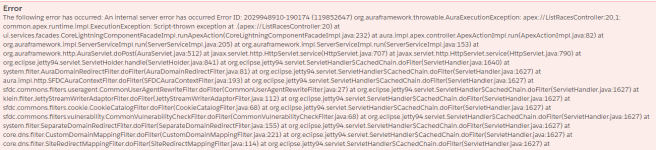
Well to begin, let’s take a look at what you would see in the browser if this code is run and the user does NOT have access to one of the fields:

NoAccessException.png

YUK!!!!

Not only is this message ugly, it is extremely unhelpful.  Surely, there must be something better?

Option 1 – a Better Error Message

Well, the first option you have is to simply replace the code that throws a System.NoAccessException, with code that throws an AuraHandledException, such as this:


 for (String field : raceFields) {
    if (!raceMap.get(field).getDescribe().isAccessible()) {
        throw new AuraHandledException(
            'Were sorry, but you do not have access to this field: ' 
            + raceMap.get(field).getDescribe().getName());
        return null;
    }
 } 

The message you will see now when one of the fields is not accessible is this:

BetterException

Much better, don’t you think?

Option 2 – Handling the Exception Gracefully

But wait, it can get EVEN better…

Instead of returning null when a field is not accessible, we can instead make a few more changes to the code, such as this:


String [] raceFields = new String [] {'Id','Name','DateTime__c',
            'Location__c','Attended__c','Type__c','Results__c' };
  
Map raceMap = 
      Schema.SObjectType.Race__c.fields.getMap();

List fields = new List();
String query = '';
for (String field : raceFields) {
    if (raceMap.get(field).getDescribe().isAccessible()) {
        fields.add(field.trim());
    }
}
if(fields.Size() > 0) {
    query = 'SELECT ' + String.join(fields, ',') + ' FROM Race__c';
    query+= ' ORDER BY DateTime__c desc LIMIT ' + pSize;
    query+= ' OFFSET ' + offset;
}
res.races = Database.query(query);
      
return res;

In this version, I am still looping through all the fields to see if they are accessible, but rather than throwing an exception when even one field is not accessible, I am instead adding the accessible field to a list I created called fields. I am then building a dynamic query string using only the fields that are accessible and finally just executing the query using the database.query method instead.

The result is that when the component renders, rather than seeing any error message at all, the user sees the list of races. But, any fields that are not accessible are just left blank.

Now, I happen to think this is the best solution. What do you think?

If you found this article useful, you might want to checkout my latest course on Pluralsight titled, Lightning Component Development Best Practices, where I talk about handling FLS exceptions and a lot more.