Curious about the Sara Has No Limits thing?

You may be wondering why I title my blog, “Sara Has No Limits”. One might guess that it has somethNoLimitsCovering to do with the limits that Salesforce imposes. Good guess, especially since I have now immersed myself into the world of Salesforce and Force.com development, but that actually has nothing to do with it.

You see, I have been an independent software developer since 2005, and in 2009, I wrote and self-published a small book about my experiences, titled, “No Limits: How I escaped the clutches of Corporate America to live the Self-employed life of my dreams” . I have to admit the book was wildly unpopular and I ended up giving away more copies than I ever sold. **sigh**

It’s okay though because I am still very proud of the book and glad that I wrote it. I learned about myself in the process and I know it touched a few people (so that is all that really matters anyway).

But, if you are curious about the book and would like to order a copy, I still have a bunch and I am obviously willing to sell them – at a very reduced price ($5.99). Basically, I am just asking you to cover the cost of shipping and a little for my time in going to the rural post office I live near to mail it to you. So, if you would like to read my spine tingling book AND you live in the United States, click the Buy Now button below.

btn_buynowCC_LG

Check Out the New Lightning Trailhead Challenge

Last Dreamforce (Oct. 2014), Salesforce announced a new interactive way of learning all about the 2015-trailhead_icons-new-lightning_components_b1ikjyForce.com platform through a new resource called Trailhead. I have reviewed a lot of online training platforms and I have to admit that Trailhead is the best free online resource I have ever seen. And just last week, they released a new training module on how to build modern apps using reusable Lightning components.

What makes Trailhead, and especially this Lightning module so special is that it challenges you to complete exercises within your own development org. And most of all, the challenges are just that. Challenges. They actually take effort and thought. They are NOT just a step-by-step tutorial re-hash like so many online tools are (not that there is anything at all wrong with that style of learning).

They provide a list of specific end goals, but they do not tell you exactly what to do to accomplish them. You have to figure that out for yourself. Typically, you will have to re-read through the module material you just read, but it is possible you may also have to do a little side research to come up with a solution.

Each challenge takes about 30 minutes, but it may take a little longer if you are brand new to the material. And, each challenge gets progressively harder to complete, so they kind of ease you into it.

If you looked into Lightning and can see what a game changer it will be to mobile development, you really owe it to yourself to go through this training module and earn your Lightning badge. I am half way there myself. Let me know if you get yours and what you thought of Trailhead. Personally, I think it is amazing that Developerforce offers this kind of high-end stuff for free!


More about Receiving Emails Through Apex

The post I wrote once about Receiving and Sending Emails through Apex two years ago has continued to be the most popular post on this blog. So, for all of you that are obviously very interested in this subject, here are some more tips about working with Inbound Emails. In a follow-up post to this one, I will write more about what to consider when sending Outbound Emails.

Creating the Inbound Email Service Handler Class

For starters, the Force.com IDE provides a neat little template for creating an inbound email service handler class. This gives you a head start on creating your inbound email service. To use it just create a new Apex class and select the template drop down box (see image below).
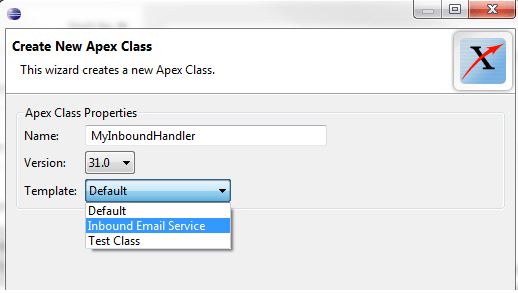
InboundEmailClassTemplate

Using the template will get you a class file that looks like the following. This is a good starting point.

/**
* Email services are automated processes that use Apex classes
* to process the contents, headers, and attachments of inbound
* email.
*/
global class MyInboundHandler implements Messaging.InboundEmailHandler {

    global Messaging.InboundEmailResult handleInboundEmail(Messaging.InboundEmail email, 
       Messaging.InboundEnvelope envelope) {
          Messaging.InboundEmailResult result = new Messaging.InboundEmailresult();

          return result;
    }
}

As you are filling in the code for this template, you may want to keep the following things in mind:

  • Be careful about creating new records in the database. Many simple code samples I have seen out there automatically create new contact or lead records when an email is received, but if you set something like this up you will quickly end up with a messy database and a lot of redundant records. A better alternative to just blindly creating a new record for each email is to have the logic in the email handler try to match the incoming email sender to an existing record. For example, you could try matching on the name and email address. But be careful here too, because the name on the email header may not exactly match what you have in your database. Probably the best way to ensure that duplication does not occur is to consider creating a task for a user in your org that sends them the email sender info so they can decide whether a new record should be created. Just something that should be discussed with your orgs decision makers before you start blindly creating an automated code solution.
  • The email body can be either HTML or plain text and the results are stored as different properties, so your code should account for this. For example, the following code extracts the email body, no matter which type it is:
String emailBody;       
if (email.plainTextBody != null){
    emailBody = email.plainTextBody;
} else {
    emailBody = email.htmlBody;
}
  • You may want to parse the body of the email and try to extract meaningful information from it, but just keep in mind that this can be very tricky if you are not 100% sure where and how the email is being originated. Obviously HTML content will be more difficult to parse than plain text, but you also do not know if the email client used to submit the email has embedded additional information or special formatting. The solution will depend on your exact circumstances and I only bring this up to make you realize that it might not be as straightforward as you think. Be sure to think this through carefully when designing your solution and try to do testing with all potential email clients.
  • Email attachments could be text or binary and each is handled differently, so you want your code to be able to accept both. For example, you might want to include code similar to the following, which inserts attachments to the Salesforce record, in this case a contact record. Now, of course, this assumes that you do not configure your email service to only accept one form or to always convert Text attachments to Binary (which is an option we will show later on). Also note that the body of a text attachment must be converted into a blob before it can be assigned to the Attachments body field.
if (email.binaryAttachments != null && email.binaryAttachments.size() > 0) 
{
    for (integer i = 0 ; i < email.binaryAttachments.size() ; i++) {         
        Attachment attachment = new Attachment();         
        attachment.ParentId = contact.Id;         
        attachment.Name = email.binaryAttachments[i].filename;Attach         
        attachment.Body = email.binaryAttachments[i].body;         
        insert attachment;     
    } 
} 
if (email.textAttachments != null && email.textAttachments.size() > 0) {
    for (integer i = 0 ; i < email.textAttachments.size() ; i++) {
        Attachment attachment = new Attachment();
        attachment.ParentId = contact.Id;
        attachment.Name = blob.valueOf(email.textAttachments[i].filename);
        attachment.Body = email.textAttachments[i].body;
        insert attachment;
     }
}

Configuring the Email Service

Once you have the code for your email handler, you will need to define the Email Service in your Salesforce Setup. You do this by going to Setup | Develop | Email Services and clicking New Email Service.

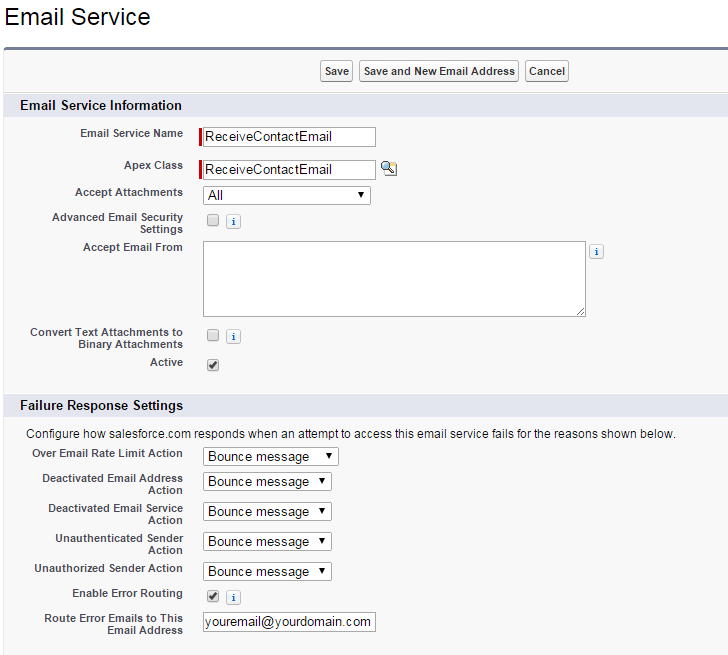
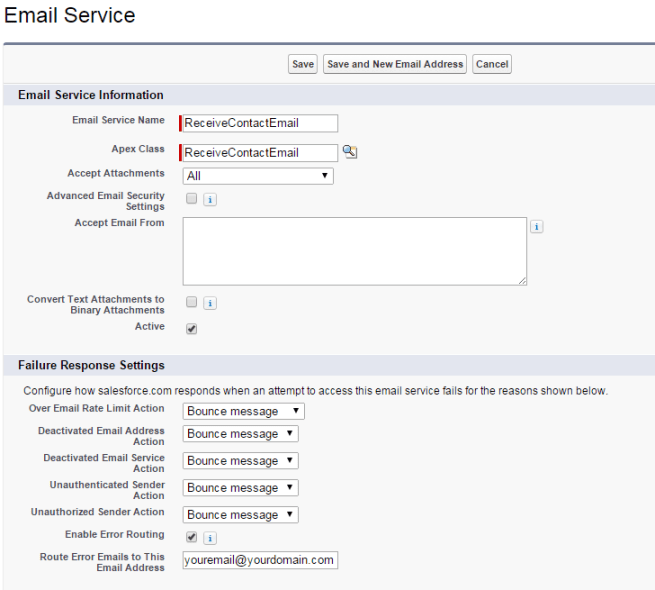
At this point, you will need to configure how your email receives incoming messages (see image below).
EmailServiceConfig1

You will of course specify the class handler you just created, but you will also need to keep in mind the following:

  • Most services are configured to accept all attachments, but you can specifically have it accept no attachments or only binary or only text attachments.
  • The Advanced security settings will restrict what emails are accepted by your service according to whether the sender uses certain protocols (specifically SPF, SenderId and DomainKeys). If you do not know for sure what protocol the sender will be using, you do not want to check this.
  • You likely do not want to specify that you accept email from a certain email address, unless your solution is so specific that you know in advance what email address will be sending incoming emails. Leave this blank to accept emails from any address.
  • Don’t forget to check the Active switch for your service.
  • While testing, you will likely want to use Bounce Message as the setting for the failure response settings, but don’t forget to go back and possibly change this after moving to production.
  • I suggest you enable error routing and specify an email address to receive error emails (certainly while testing and maybe even after moving to production).

The next step is to configure the email address that will accept incoming emails (although you can specify more than one). This is the email address that outside users will send email to. Unfortunately, you have no control over the domain name part of this address.  You only get to control what the part before the @ sign looks like. A typical generated email address will look something like the following (where I only got to specify the recievecontactemail part):

receivecontactemail@2fiwoie9n02fazrqxzvaars35bdrih1hxlzg6ij79u66vorcd8.d-dxwdeae.na14.apex.salesforce.com

Ugly, right?

Yeah, I know. If you just can’t see yourself giving this address to people or posting it somewhere, you might want to consider creating a forwarding address (with a much prettier and easier to remember name, like receivecontactemail@yourdomain.com) and then have that email address just forward all emails to the ugly looking one that Salesforce creates for you.

Testing your Email Service

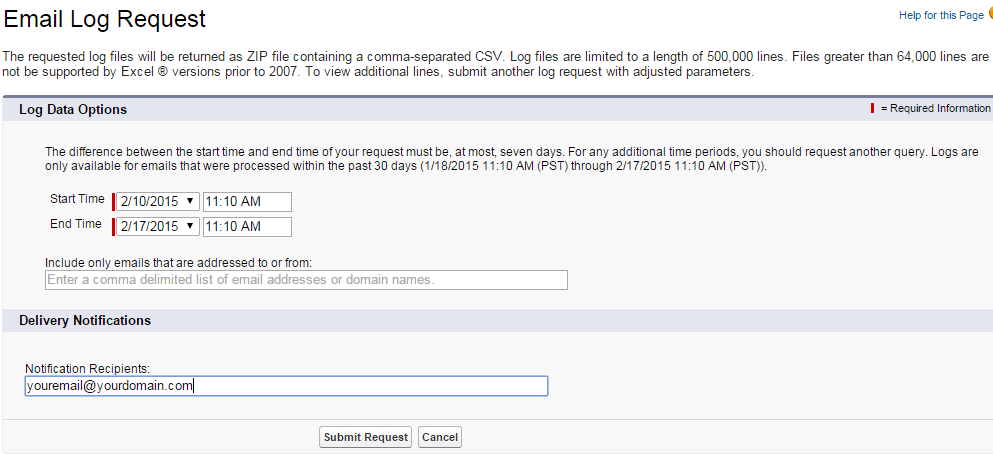
As of Spring 09, Salesforce provides access to Email Logs, which contain info about email sent and received over the last 30 days. You access them through Setup | Monitor | Logs | Email Log Files. You will need to go in and specifically request a new log before it is generated (see image below).
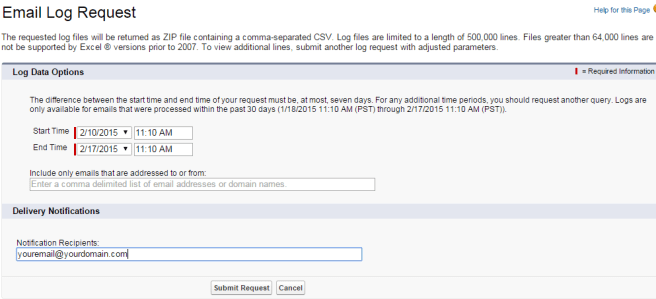
EmailLogRequest


You will have to specify a start and end time and the period can be no longer than 7 days. Doing so will generate a CSV file that tells you information such as the email address of each sender and recipient, along with the date and time and any error codes encountered.

You may want to also consider creating a custom error log object. This can be used to store any exceptions or debug statements. For example, you could create a custom object named ErrorLog with text fields used to store the message and other info you may want to capture. Then, in your email handler class, you add try..catch statements that write to the log when an exception is captured.

That’s it for now. More about Outbound Messaging in a later post.


Check out the Free and Unrestricted Version of Visual Studio – Community 2013

VSI am an independent developer, so I am responsible for purchasing my own software. Hence one of the big reasons I have been so turned off by Microsoft in recent years. But, I am happy to say that Microsoft may finally be learning their lesson and truly turning a different cheek.

In November of 2014, Microsoft announced a free and unrestricted version of Visual Studio 2013. The new version is named Visual Studio Community 2013 and it is a full featured IDE for free – no kidding, it’s free.

There is a slight catch. You can not use it in an Enterprise setting, but come one, that is fair. If you are working in an enterprise, you do not need a free version. But for all of us that work outside Corporate America, a free and unrestricted version is like a god send.

So, thank you Microsoft. I may have judged you too harshly in the past. I consider this version of Visual Studio a peace offering. And, I look forward to seeing the free Community version of Visual Studio 2015 when it is released.

Great FREE online class about Lightning

SalesforceU, the people who bring you all the premier online and class-driven courses about Salesforce technologies, have just released a new online course that walks you through what you need to get started developing with Lightning. This is a beginner course, but since Lightning is so brand new this is a GREAT way to get up to speed quickly. Lightning

And in case you do not know, Lightning was announced at last years Dreamforce 14. It is a component-based development technology that allows Salesforce developers to build responsive Salesforce1 mobile applications quickly and easily – for any kind of device.

The only downside about the course is that it is only available through a paid Salesforce edition, so you will not be able to access it through a trial org or Development org. But, if your company has a paid subscription, then you can login and access it through the Help & Training Standard Catalog, or though this link.

Another important thing to note is that if you go to the link I just gave you, you get a listing of 6 modules that this course consists of. If you click any of the links, it spawns a new browser tab and starts that module. Unfortunately, the player does not let you go directly to the next module, so when you get to the end of a module, do not think that is the end of the course. It is just the end of that module. You will have to close that tab and go back to original tab that displayed all the modules to click the link of the next module.

The course is taught by Salesforce MVP, Instructor and Advanced Developer Don Robins, and he does a great job of stepping you through all the material in a way that does not put you to sleep. He starts slow and makes sure you understand exactly what Lightning is and what the implications of it are. He then takes you through all the specific parts that make up a Lightning application and explains in practical detail what you need to know. By the end of the course (which is a little over one hour), you will understand how to asynchronously bind to your Salesforce data in the back end, how to nest components to build complex mobile pages, and how to handle events so you can build interactive mobile pages that respond quickly to user input. He walks you through creating a mobile app that displays expenses and lets users approve them right from the Salesforce1 app.

If you are the type of person that learns best through videos and not reading through boring documentation, then this is for you. It is a great first step for learning about Lightning. I found it a lot more helpful than working through the Lightning tutorials at Dreamforce. Those were helpful at getting my hands dirty, but they didn’t really teach me much about the underlying technology, as this online course does. This course does a great job of explaining in detail how things work and puts all the pieces together.

So check it out and let me know what you thought about it…


Accessing Salesforce SOAP API through a Proxy Server with a .NET Service Reference

soap If you need to access the Salesforce SOAP API through a proxy server using a .NET Service Reference, you may be confused about how to do this exactly. This would be needed if your .NET application needed to access Salesforce through a firewall. Unfortunately, there is precious little info out there on the Internet (especially when it comes to accessing Salesforce specifically) about how to do this precise thing, hence why I am writing this post.

When adding a web reference (which by the way is considered outdated) you would accomplish this by creating a new WebProxy object, setting the host and port for this object, along with any network credentials that might be needed and then assigning this object to the services Proxy class. This is considered such an outdated method by Microsoft, that MSDN has retired the content that references how to do it.

Microsoft prefers that you use a Service Reference when accessing web services, yet the code to do this is not so easily found. Turns out the solution is pretty simple. Service References allow you to do more advanced configuration through the more easily accessed web.config or app.config files.

BTW, If you want to learn more about the differences between service and web references, check out my DeveloperForce article on this very subject.

The simplest way to configure your application is to add something like the following to your web.config or app.config file:

<system.net>
<defaultProxy useDefaultCredentials=”true”>
<proxy usesystemdefault=”True” proxyaddress=”http:\\Proxy IP Address:Proxy Port”/>
</defaultProxy>
</system.net>

You just need to replace the Proxy IP Address and Proxy Port placeholders with whatever values apply.

Hope this helps someone avoid a lot of wasted time searching the Internet.

I am officially a Salesforce Advanced Developer!

As Peter Chitum suggests in his well read article, The Path to the Advanced Developer Certification, when you do finally pass this arduous certification process you should, “Say it loud, say it proud“….cert_dev_adv_rgb

So, I am happy to announce that today I was informed that I have Passed the Advanced Developer Assignment and I am officially an Advanced Developer.  YEAH!!!!

It took me one year longer than I expected, but it was very much worth the wait…and all the fuss. Actually, I am glad it was so hard to get. It makes getting it more worthwhile.

Several years ago, I went through both the Microsoft Certified Solution Developer (MCSD) and Microsoft Database Administrator (MCDBA) certification tracks, which were also long and exhausting. But, I have to say that I am a little prouder to have achieved this latest Salesforce certification. Even though the number of exams was less, I felt like the one Advanced Developer exam I did take was much more exhaustive in what it tested. I also was never tested with a programming assignment, which ensured that I followed best practices.

I also have to admit that I spent a lot more than the suggested 20 hours on my assignment (60 hours to be exact), but that is just because it was so important to me that I passed. I agonized over everything and questioned myself a hundred times. Glad I did now. I also dedicated an entire week towards doing it (with no other distractions). I think that helped a lot and I would suggest it to anyone else taking the exam (if you have that option).

Good luck to anyone else working the track. Stick with it and read, read, read…


Force.com Canvas and .NET Considerations

Introduced in Winter 2013, Force.com Canvas offers a way to host non-native (aka, non-force.com) web applications within Salesforce. Using a signed request, applications developed with your language of choice (including .NET) can connect to Salesforce and access data without requiring the authenticated Salesforce user to also log in to your web application.

I really like this technology because it opens up lots of opportunities for developers and allows shops with little Force.com experience another option. However, that does not mean that using it is all sunshine and butterflies. For one, it is very new and so there is not a lot of documentation out there (especially about .NET). The official developers guide is focused more towards Java developers, yet there are some very specific considerations that need to be made when working in the .NET environment. I recently had the opportunity to convert a Java Canvas app to an MVC Canvas app and this article highlights some of the main considerations you need to make when working in that environment.

MVC Project must use No Authentication

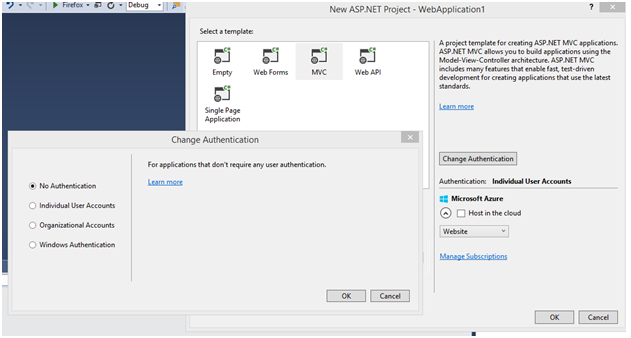
If you are creating a new MVC app, you will need to click “Change Authentication” when creating the project and select “No Authentication” (see NewMVCprojectImage). This will mean that the authentication scaffolding that ASP.NET adds to the project will not be included. I was not able to make a canvas app work with this scaffolding included. Perhaps, it can be done, but the only way I could make it work was to create a new project without the authentication (which makes sense since the authentication is being handled by the signed request and Force.com Canvas).

Must set SSL Enabled Property to True

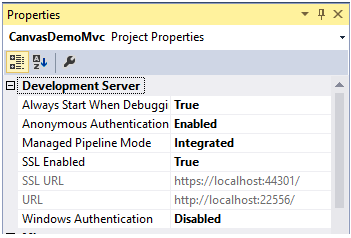
Regardless of whether an ASP.NET Web forms or MVC application is used, you will need to set the site binding as HTTPS by setting the SSL Enabled property to True. You will also need to ensure that the Managed Pipeline Mode is set as Integrated. These properties can be CanvasMVCPropertiesaccessed by right-clicking the project in Solution Explorer and looking at the properties in the Properties window(see image). Also, note here that the SSL URL is the one you will want to use as the Canvas App URL when setting up the Connected App in Salesforce.

May want to consider using the following GitHub project to do handle the Server-side Authentication

In my project, I created a couple of class files to handle the server side validation of the signed request token passed in from Salesforce. However, to make your life easier and speed your time to development, you may want to consider downloading and using the following GitHub code to do the verification part. I did not find this code until after I had written mine and I thought mine was more streamlined, so I opted to go with it instead. But, looking at Shawn Blanchard’s code could give you a HUGE head start. If you don’t like that example, then you can check out the code that Paul Short posted here. It shows how to do the verification part for both a web form app and an MVC app.


Real-World Advice for New Salesforce Developers

At this years Dreamforce (2014), I did a talk about Career Strategies for Developers Transitioning to Salesforce. I interviewed several developers, who all had some great advice to share. Even though I have spotlighted three developers who had a lot to share, this post is a summary of some of the best advice they ALL offered for those developers new to the platform.

EricBellEric Bell – Salesforce Developer at Polymorph Corporation

“As in everything else execution is critical. Newbies will make many, many mistakes but it in the actual doing it that they have the best chance of learning, improving and mastering. They need someone with experience to review their work and make improvement suggestions. This is the only thing that counts in the end – doing it.”

RahulBorga  Rahul Suresh Borgaonkar – Salesforce Developer at SYNETY PLC

“Certification will give you basic knowledge but experience counts a lot. Always try to get hands on approach if you find anything new as you will remember it for future use. Read latest blog updates and developer board all the time. Get inspired by people who have achieved all Salesforce certification and try to follow them. This will refresh your knowledge and keep you in learning mode.”

MichaelClaytonMichael Clayton – Software Developer at American Thoraic Society

“Go light in salesforce. the ease of development can sometimes encourage bad habits, like quick and dirty code.”

HargobindSinghHargobind Singh – Technical Architect at Acromobile

“Read Documentation, End-To-End. No exceptions or shortcuts. Study guides, e.g. Apex Guide, Visualforce Guide, and Apex_API.pdf have a lot of information. Though it takes time to read, and it might seem that just reading relevant topics is enough… but this would be time well spent. There are so many aspects of everything in Salesforce that knowing things completely is the only road to success. In addition, if a developer knows all aspects, they can implement an optimum solutions. In my whole career, I have seen a lot of newbie developers writing non-optimized code, and using code where they can use point-and-click, or not implementing not-to-hit governor limits. “

JasonHammerleJason Hammerle – Salesforce Technical Architect at PROS

“If you already program in Java or C# then the transition will be very easy for you.  If you are a front end developer then your experience would likely be extremely valuable to a Salesforce development team.  And to all other developers (and even managers), you can be a Salesforce developer too by leveraging the great Salesforce training course, Salesforce resources, Success forums, blogs, and the many many people (like Sara) that have already transitioned and really want to help you.  I also very much would like to help anyone that wants to make this transition too.”

michaelwelburnMichael Welburn – Salesforce Technical Architect at 7Summits

“Pay attention to the best practices that are documented, you will see them ALL. THE. TIME. https://developer.salesforce.com/page/Apex_Code_Best_Practices The workbooks that Salesforce provides for Force.com, Apex, and VF are also extremely helpful. https://developer.salesforce.com/page/Force.com_workbook Beyond that, just get your hands dirty in a dev org! “


Pagination and the StandardSetController – No Custom Controller Required

When I designed the code for my online course for lynda.com called “Developing with Visualforce“, I looked for solutions that were as simple as possible. After all, even I will admit that developers do tend to over complicate things unnecessarily.

One of the areas I was covering was handling multiple records and therefore pagination was introduced. In my research for the course, I uncovered dozens of posts/tutorials by developers using Custom Controllers or Extensions to implement this functionality. For a while I thought this was the only way it could be done. Since the underlying message for my course was to find the simplest solution possible, I am glad I dug a little farther and found a way to provide the necessary pagination without the need for a custom controller.

I discovered this while reading through the very excellent online resource titled, “Visualforce in Practice“. This very practical guide was published in 2013 and it contains many tips for development that were discovered through years of practice. Chapter 4 of this guide covers the Standard List Controller and the corresponding StandardSetController. What it revealed was that despite the fact that even the Salesforce documentation leads you to believe that you need a custom controller extension to change the page size, this is not actually. true. You can in fact do it using just the Standard Controller and referencing PageSize member variable. You can then change the page size by adding a command button with a NULL action to force the controller to update.

For example, the page that I created for the course, displayed multiple opportunities that could be edited by the user (see Figure below). At the bottom of the page, I included buttons to page the user through the results, but I also wanted to include a way for the user to change the default of 20 records per page.

EditOpportunities

This was accomplished by simply adding standard apex controls to the bottom of the page. No custom controller or extension required. All the code needed to produce the page you see above is as follows:

 <apex:page standardController="Opportunity" recordSetVar="opportunities" tabStyle="Opportunity">
    <apex:form >
        <apex:pageBlock title="Edit Opportunities" >
            <apex:pageMessages ></apex:pageMessages>
            <apex:pageBlockButtons >
              <apex:commandButton value="Save" action="{!save}"/>
              <apex:commandButton value="Cancel" action="{!cancel}"/>
            </apex:pageBlockButtons>
            <apex:pageBlockTable value="{!opportunities}" var="opp">
                <apex:column value="{!opp.name}"/>
                  <apex:column headerValue="Stage">
                    <apex:inputField value="{!opp.stageName}"/>
                  </apex:column>
                  <apex:column headerValue="Close Date">
                    <apex:inputField value="{!opp.closeDate}"/>
                  </apex:column>
            </apex:pageBlockTable>
            <apex:panelGrid cellpadding="5" cellspacing="5" columns="5" >
                <apex:commandButton value="|<" action="{!first}"  />
                <apex:commandButton value="<" action="{!previous}" rendered="{!HasPrevious}" />
                <apex:commandButton value=">" action="{!next}" rendered="{!HasNext}" />
                <apex:commandButton value=">|" action="{!last}"  />
                <apex:panelGroup >
                    <apex:outputText value="Records/Page"></apex:outputText>&nbsp;&nbsp;
                    <apex:selectList value="{!PageSize}" size="1">
                        <apex:selectOption itemValue="10" itemLabel="10"></apex:selectOption>
                        <apex:selectOption itemValue="15" itemLabel="15"></apex:selectOption>
                        <apex:selectOption itemValue="20" itemLabel="20"></apex:selectOption>
                    </apex:selectList>&nbsp;&nbsp;
                    <apex:commandButton action="{!NULL}" value="Update Page Size"/>
                </apex:panelGroup>
           </apex:panelGrid>
         </apex:pageBlock>
    </apex:form>
</apex:page>

I very much prefer this solution to the one that requires a custom controller. It is easier to maintain and does not involve creating unit tests to deploy. Hope this helps someone else to not over complicate code they are creating. If you are interested in learning more, check out my online course for lynda.com called, “Developing with Visualforce“.