Can’t Miss Salesforce Security Webinar Series

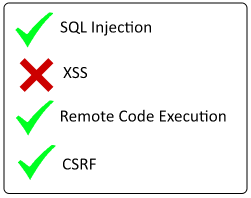
vulnerabilities_checklistI know security is probably not your favorite subject. But these days, it seems like everyday there is another major story coming out about how some big company has a major security breach. A lot of companies use Salesforce because it is secure and trust is so important. But as a developer, you have to realize that there are MANY ways you can bypass all the terrific security features Salesforce has put in place.

Developers have lots of flexibility that gives them power, but with power comes responsibility. It is so important you are aware of all the ways you may inadvertently make your app vulnerable to attack. Unfortunately, most of the documentation on this subject is loooooonnnnnggg and how shall I say this….BORING!

Well, for all you visual learners that really love practical examples, your help has arrived. The Salesforce security team has begun a series of Webinars designed to get developers up to speed with some practical, code-based demonstrations that show:

  1. How we as developers can inadvertently bypass security
  2. What you can do to correct the mistake and make your app secure again

So far there are only 2 webinars in the series, but just watching these two will probably teach you more than you get by trying to pour through and interpret all that other boring documentation.

Hope you find these as helpful and enlightening as I did. And thanks to the Security team for taking the time to put the sample app together along with these webinars.


The Eclipse Force.com IDE makes an Epic Comeback – with support for Lightning!!!

I was so happy to see recently that Salesforce was refocusing it’s efforts towards improving the Eclipse Force.com IDE. It has also now gone open source. But I was MOST pleased to see that the beta version now offers support for Lightning components.

Developer Console is “ok”. Well, let’s be honest, as a serious development tool, it still sucks, although it is getting better with every release. There are also a plethora of other development tools that have popped up recently, but most of these are not free. Most developers I know use the freely available and very cool, MavensMate. Although, it’s creator Joe Ferrara has recently suspended development so he can focus on his newborn. Good choice by the way, Joe!!!.

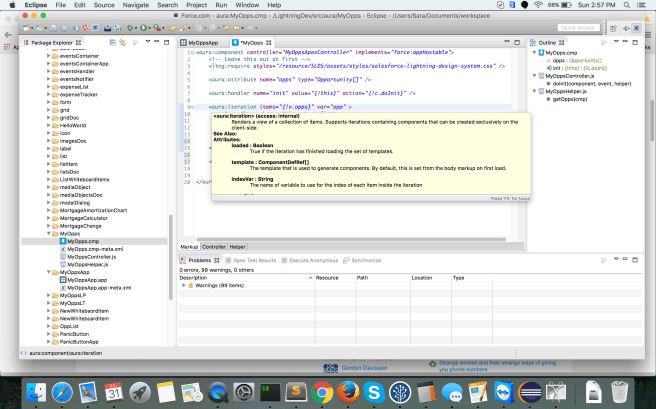
But now, here comes Salesforce with something that not only includes Lightning support, but it also has some pretty nifty features that I think will make it a serious contender in the Salesforce IDE world. I really like the hover over documentation support that you see in the screenshot below. As well, as the outline pane over on the right, that allows you to quickly move back and forth between component bundle files.

ForceComIDE.png

But my absolute favorite thing is the auto completion, which is invaluable if you are just learning about Lightning. This missing feature almost made me not use Developer Console for my first Pluralsight course. But, I am so glad because not only can I use a free tool in my next course, I can use one that is fully supported by Salesforce themselves.

Way to go Salesforce! Much appreciated!!!

One big gotcha to keep in mind though is that you cannot run the Beta version of the IDE along with your prior version of the IDE (if you are indeed using it).


More Info about the Apex Realtime Debugger

If you happened to catch my post last year about the release of the new Apex Realtime Debugger, then you might also be interested in checking out this demo recording which was made at the recent TrailheaDX conference last month.

The short talk was given by Greg Wester and if you are really just interested in seeing a good demo of the Realtime Debugger, then I suggest you skip the first 5 minutes of the 16 minute recording.

Greg also reveals at the end certain FAQ’s that you might be interested in which include:

  • The Debugger only works in the Sandbox and there are no plans to ever have it work in production.
  • Licenses are assigned via permission sets and you can only have one instance running per org.
  • It does not support asynchronous code. Only synchronous operations.
  • You can get a trial of the debugger if you contact your Account Exec.
  • This fall they will be doing a pilot with vendors that allows them to step through managed code. This should be of big interest to ISV’s out there.

ApexDebugger

Top 5 Lightning Component Framework Tips

top5This is a list similar to the one I did for Visualforce, which continues to be one of the most popular posts on this blog. So, I thought since I just published a course about Lightning development, I should do a Top 5 Tip list for it as well.

#1 – Refactoring is a Key Principle

Building Lightning Components is very different than traditional web development. When you are first getting started with this type of development, you are better off if you accept right from the beginning that refactoring is inevitable.

When you are first evaluating a solution, the right combination of components may not be intuitively obvious. This is especially true if you are coming from an object-oriented background and tend to look at breaking everything up into nouns and verbs. That approach does not really work with component-based design.

More than likely, you will start off with a design and then find that it makes more sense to refactor your code and break it up into additional or even nested components. There is nothing wrong with this and when developing with the Lightning Component Framework, refactoring is typically quite painless.

#2 – Apps and Components Run in System Mode

All Lightning apps and components run in system mode, which means that it is possible for your components to expose sensitive data without the correct permissions checks. The first thing you want to do is always include the with sharing keyword in all Apex code. This will enforce record access. But, to make your components truly secure, you must also include CRUD (Create Update and Delete) and FLS (Field Level Security) permission checks.

All Lightning apps and components run in system mode, which means that it is possible for your components to expose sensitive data without the correct permissions checks.

Unfortunately, most of the sample Lightning code that is out there right now (including what is on Trailhead and even what is in my first Pluralsight course on Lightning development), does NOT include code to check for proper CRUD or FLS access on the server-side.

In all fairness, Trailhead does include comment markers telling you where it should be inserted, but does not include the code. And in my course, I include a discussion about this topic in the last module and suggest that the viewer add this code themselves as a learning experience. It is not ignored. It is just that when you are learning how to develop Lightning components, there is a bit of a steep learning curve that goes with it. Educational providers such as Tailhead and my first Getting Started Pluralsight course are introducing you to all this in baby steps.

That does not mean that the concept of checking for CRUD and FLS permissions in your Apex server-side code is not important and why I wanted to include this as one of my tips. So, what is all this about?

Since Lightning components do not automatically enforce CRUS or FLS, your components must do this manually. You should check isAccessible(), isDeleteable(), isCreateable() and isUpdateable before running any queries or DML statements.

My friend at Salesforce University, Andres Perez has posted to his GitHub repo a secured data access helper that you can download and install into your org very easily. It includes methods to both query the database and perform DML securely and will throw back an exception if not valid. I strongly suggest that you check it out and consider using it with your projects.

#3 – Mark Most Resources as Global

You should mark your component resources as global for any that need to be accessed outside of your own org. Otherwise your components, attributes and events will not be seen in Lightning App Builder, Community App Builder or an installed package.

For the moment, the access check restrictions are limited and not being checked for all resources. This means that it is possible for you to create a Lightning component now, not mark it as global and have it show up fine in an outside tool. But then, in a later release, the access checks will be tightened and all of a sudden your component is no longer visible or usable.

Therefore, I suggest automatically marking all the following resources with access=”global”, unless there is a security reason not to expose them to outside tools:

  • aura:application
  • aura:interface
  • aura:components
  • aura:attribute
  • aura:event

#4 – Use Lightning Inspector to Debug and Learn about Lightning

The Salesforce Lightning Inspector is a Google Chrome DevTools extension that offers a lot of really neat features that can help you not only debug your Lightning app, but also learn more about Lightning in general. For example, the Components Tree, which you can see an image of below, shows you attribute names and values for all your Lightning components. Not just the rendered HTML elements, but the actual components as they are defined in your source code. This can be really valuable when you are trying to identify default values for component attributes.

LightningInspector2.png


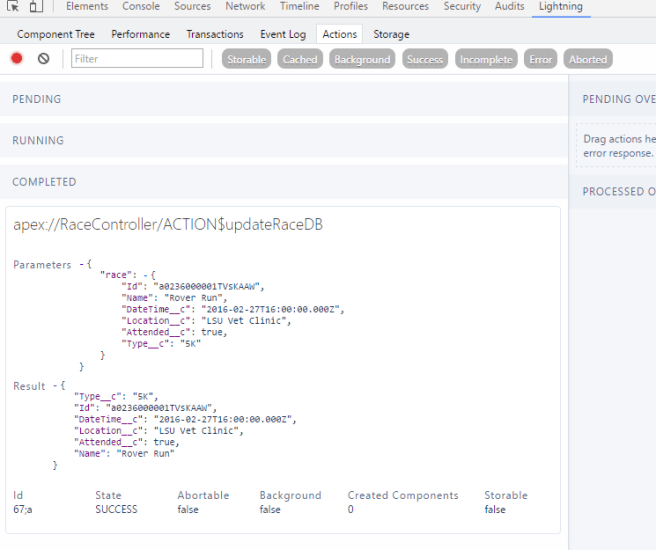
Other useful tabs include the Event Log and Actions. My favorite is the actions, because you can see exactly what data in being passed into the action and then what is being passed back (see image below), which can be incredibly useful when debugging an issue.
ActionsTab.png

Just keep in mind that when using these tabs, you do need to turn on the recording before you will see results. You do that by clicking the circle icon in the top left corner, which in the screenshot above is red since recording was turned on. If it wasn’t that circle would be grey.

#5 – Take Advantage of Built-in Docs Feature

The last tip involves documentation, which I know is not typically a developers favorite subject, but Lightning makes it so easy to document your components, that it would be silly not to take advantage of this.

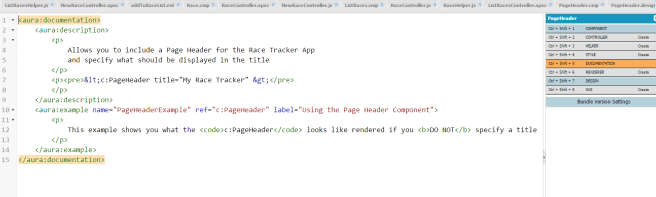
You can add a document resource to your component bundle, such as you see in the image below:
DocumentResource.png

Once created, this documentation resource will be rendered in the AuraDocs app, which every Lightning enabled org has and can be accessed through a URL, such as the following:

https://saralightning1-dev-ed.lightning.force.com/auradocs/reference.app

Where you replace the end of your unique org URL with /auradocs/reference.app

So, my rendered doc resource file defined above, will look like the following:

RenderedDocResource.png

Cool, eh?

Even if you do not want to create a document resource for your component, then you can at least add a description attribute for each of the following elements:

  • Components
  • Attributes
  • Events
  • Interfaces

These descriptions will automatically appear in the AuraDocs for your org (even if you never create a document resource).

 

The Next Generation of Programmers, Listen Up!

Want to know what you need to know to be ahead of the curve in the world of Software Development?

Look no further than the following YouTube video, which was recorded during last years Dreamforce. It was a talk about “Modern Architectures: Above the Platform, Beyond the App” and it details all the things YOU (the next generation of programmer) needs to know to be successful in the new generation of app development.

Unfortunately, as of today, it has only been viewed 145 times and yet should have been PeterCoffeeSalesforceDotCom_sq300-269x200viewed 145 million times. In this video, Peter Coffee, the VP of Strategic Research at Salesforce is going to give you a message that you really need to hear.

I hope you take the time out of your day to hear his message. It is a VERY important one. Make sure you make it to the 26 minute mark when he says that, “We need to go further and provide an experience y recomposing what we used to call apps. We need to write code that intuits desire from behaviour, learns history and applies it predictively…”


First Pluralsight Course About Lightning Published

Author-Badge_Sq-Black_SmallI am proud to announce that my first course for Pluralsight which is titled, “Getting Started Building SPA’s with Lightning Component Framework” was released last night.

Here is the course description:

Learn how to build single page apps (SPAs) with the new Lightning Component Framework.  This modern framework is built on the open-source Aura Framework and includes all the tools and technologies Salesforce enterprise developers need to build responsive and efficient component-based applications for any device. You’ll learn the basics of building Lightning components by stepping through building a single page app used to track race participation. You will also learn to apply professional styling, handle events with JavaScript client-side controllers and access data with server side controllers using Apex code. The course will finish off by showing you how to document your components and debug the Lightning App using browser tools.

I strongly believe that component frameworks like Lightning really are the future of web-based development. All of the major vendors, such as Google (with Polymer), Facebook (with React), Twitter (with Flight) and Mozilla (with Brick) are investing in component frameworks.

Lightning is also a JavaScript-based framework, but unlike the other JS frameworks like AngularJS, Backbone and React, Lightning is the only one of those frameworks that is designed specifically for enterprise applications.

So, if you do not know about Lightning and want to find out more, I hope you take the time to check out my new Pluralsight course. And, I would love to hear what you think about it.


Annoying Lightning Bug you want to be aware of

dreamstime_xl_25648715I just completed development of a new course about Lightning component development for Pluralsight, which I will be telling you more about soon. But, in the meantime, I wanted to blog about a very annoying bug that I ran into several times as I was developing the course that I thought you should be aware of.

The issue involves seeing Access Check Failed warning messages all over the console log in your browser tools. They indicate that there is a problem with components you have no control of (such as any of the ui controls, like ui:inputText, etc). For example, this is one such error I saw:

WARNING: Access Check Failed! Component.getEvent():’change’ of component ‘markup://ui:inputSelect {38:2;a} {Type}’ is not visible to ‘markup://c:RaceTrackerApp {1:2;a}’.

I did extensive research on this issue and did get a confirmation from the guy at Salesforce in charge of this area that this is likely a bug they have already identified, but not yet resolved (see the comments at the bottom of this post).

This error can be ignored, BUT you do not want to ignore all Access check failed messages because some are indeed valid. For example, any that involve components you do have control over. For these, you want to use an access attribute for your component, attribute or event. You can find more info about that here.

Hope this helps someone.

Is There Really No Work-life Balance for Software Developers?

balanceI was reading this interview with the CEO of Microsoft, Satya Nadella and one thing he said really stood out to me. When asked what advice he would have for readers struggling with work-life balance, he responded with, “There’s no such thing as balance.”

Really?

Well, if you are the CEO of Microsoft, I suppose there might not be, but I do not think that is true for all people in this field. I personally think it just depends on what your real priorities are and whether you are willing to sacrifice for them.

For myself personally, I think I have a wonderful work-life balance. While I do not earn a six-figure income and I do not have a fancy job title or an MBA, I do consider myself extremely successful. My priorities are not about how much I earn or what title or degree I hold, but how much of an impact I have on “my world”, the only world that really matters to me.

And what is my world, you might be asking?

Well, it is me and my immediate family, and my community.

Eleven years ago I left the trappings of Corporate America and became independent. While I have had my ups and downs, I would not trade this life for anything. It has brought be more peace and success than anything I have ever done in my life.

It allows me to work remotely from home and therefore be here everyday when my kids leave for school and when they return. We eat a home cooked meal every night as a family and most days of the week, I take time to go for a run in the woods, as well as take quiet time each day to meditate and pray.

Now one thing Mr. Nadella said that I do agree with is, “And I think about time spent, then my work had better be something that’s nourishing to my soul and my personal philosophy, and so on.”

Absolutely!

And I think being independent allows me to do this more than ever. My day to day tasks are not dictated by corporate philosophy, but by my own personal choices. I engage in the jobs that are of the most interest to me.

Currently, I am completing my first course for Pluralsight about developing with Lightning. It has been tremendously fun for me to put together this course and know that it will likely have a positive impact on someone. I am very proud of it and look forward to it’s release, which I will tell you more about soon.

So, while Mr. Nadella has certainly made an impact on Microsoft. I wonder what impact he really had on his kids considering his statement, “Because if we look at it, I would have spent more time at Microsoft than living together with my kids.”

Really?

What a shame. Just glad I don’t have to say the same.


Learn Lightning with Siri

If you have heard about Salesforce’s new Lightning development platform and are curious to learn more about it, I strongly suggest you check out Teaching “Siri” Lightning Components: Building a Hello World Example at ElToro.IT.

ElToro (which stand for “The Bull”, by the way) is the alias used by the extremely talented Salesforce University Instructor, Andres Perez. Andres is producing a series of instructional videos that teach you all about Lightning. But, the really clever thing he has done is to not only make the videos informative, but also extremely entertaining. Throughout the videos, he banters with Siri, because the premise is that he is teaching Siri all about Lightning. Even though, he just has one video so far, I have no doubt that the rest will be just as good.

Great job Andres!!!

Apply .NET Skills to Salesforce

NETTrailReleased yesterday is a new trail titled, “Apply .NET Skills to Salesforce” and it is all about wooing more .NET developers to the Salesforce platform, which I am of course, all for.

This FREE and most excellent resource is written by a .NET developer for .NET developers. It does not sugar coat anything about the platform, but instead tells .NET developers honestly and directly what the platform offers and how their existing .NET skills can allow them to transition easily to Force.com. It also points out a lot of the common pitfalls they will want to avoid to be successful on the platform.

It consists of two modules. The first is all about SOQL and database basics and it has the following 4 units:

  • Moving from SQL to SOQL
  • Writing SOSL queries
  • Writing Efficient Queries
  • Manipulating Records with DML

The second module (which is my absolute favorite), it all about Apex and the Force.com platform and it has the following units:

  • Mapping .NET concepts to Force.com
  • Understanding Execution Context
  • Using Asynchronous Apex
  • Debugging and Running Diagnostics

I hope you check them out, as well as the Salesforce platform, which is growing more impressive by the day. And please let me know what you think.