In late 2024, there will be an instructor led 3-day course that teaches how to use Salesforce products such as Agentforce. (Available in San Francisco and London, with more opening in AMER and APAC regions).
But, my favorite and the one I plan to take advantage of is the chance to earn one exam attempt for either of these two AI certifications:
AI Associate– Allows you to provide informed strategies and principle regarding This one is pretty easy to get and you can check out this post about tips for studying to this one.
AI Specialist– Allows you to implement out-of-the-box AI Capabilities that Salesforce offers. Includes Einstein CoPilot, Prompt Builder and Model Builder. This is the one I plan on taking for free soon.
Even though these free offerings involve Salesforce AI solutions and practices, they are still a great opportunity to get up to speed on all that Salesforce is offering and prove that you know it.
I recently wrapped up a course for Pluralsight about “Salesforce Einstein: The Big Picture”. By the end of the course, I identified key areas where special attention could bring about success. Here are four specific tips and resources on preparing for your own success.
#1 – Get Your Data in Order
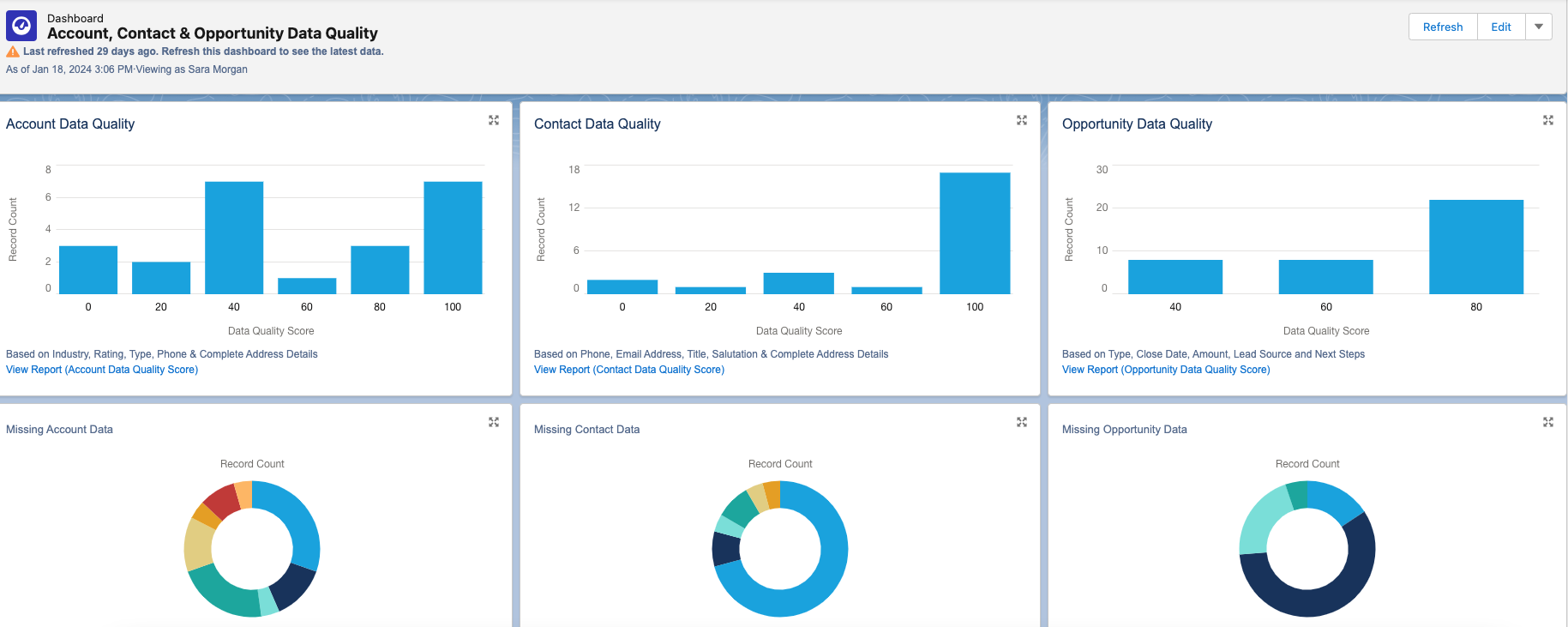
High quality data is crucial for the Einstein engine. Issues like missing records, duplicate entries, and inconsistent data standards can cause problems. It’s important to regularly review and update data to prevent inaccuracies.
This tool provides reports and dashboards to track data quality for various standard objects. Each dashboard includes a report that you can drill down into for further detail. You can also customize it to monitor additional custom objects.
# 2 -Consider Bias
In computer systems, bias can cause unfair outcomes, even if not on purpose. It’s important to identify and deal with bias to ensure fairness in models and data quality. Here are some types of bias to watch out for:
Measurement Bias: Occurs when data is oversimplified or mislabeled, leading to over or underrepresentation of certain groups. For example, using zip codes could unfairly include or exclude customers from certain areas.
Confirmation Bias: Happens when models reinforce existing belief systems. For instance, a recommendation system based solely on past purchases may limit options for customers.
Association Bias: Occurs when products are connected based on past assumptions, like assuming only girls play with dolls and boys with trucks.
To reduce bias, involve a diverse group in planning and design. Let everyone offer feedback freely and make sure they understand the importance of ethical design and bias detection. This group can also help review results and decide necessary changes.
When choosing training data, consider its source and potential biases. Removing biased data or fields from the dataset can prevent reinforcement of bias in AI systems.
By dealing with bias in the planning and design stages and including a diverse group of participants, we can move towards more fair and ethical AI systems. Check out this blog post for more on how AI can amplify biases.
# 3 -Go with the Flow
Models created with Prediction Builder or Recommendation Builder can produce a score that results in a recommendation. The recommendation is just a suggested action given either to an employee or a customer. For example, “Upsell this customer to the following package our company offers”.
Einstein Next Best Action is a tool used to create an “action strategy” based on that recommendation.
But what is an Action Strategy?
Quite simply it’s a flowchart that automatically executes business logic to generate some type of output. It could be an instruction given to an employee, a task assigned, an email sent, etc. The choices are endless.
For now, you can create strategies with Strategy builder or Flow builder, but be aware that Salesforce plans to retire Strategy Builder in the future, so I suggest only using Flow Builder. If you are not familiar with Flow Builder, now is the time to learn.
It is not difficult to use, but the flows you need to build may be quite complex, so the more comfortable you are using it, the better. I suggest you check out:
Are you familiar with ChatGPT? It’s quite the tool, capable of impressive feats. But let’s face it, sometimes it falls short of our expectations. The secret to unlocking its full potential, along with other GPT products from Salesforce, lies in the art of crafting the perfect prompt.
So, what’s a prompt? It’s simply the input you give to ChatGPT or any similar tool to get the desired output. But here’s the catch: getting the right answer often requires some trial and error. You ask a question, ChatGPT responds, and if it’s not quite what you need, you refine your prompt and try again. It’s a bit like a conversation where you keep tweaking your query until you hit the jackpot.
But who has the time to craft elaborate prompts every single time? Not your average Sales or Service rep, that’s for sure. That’s where prompt templates come into play. These are pre-made prompts tailored for specific scenarios. They’re like ready-made templates you can select whenever you need ChatGPT to do something for you.
But here’s the real magic: connecting these templates with your Salesforce data. This is where merge fields come in handy. They allow you to pull in information from Salesforce, making your prompts even more powerful.
Designing a prompt template, especially for something like crafting a customer email, requires careful planning. You need to consider who the email is for, what it aims to achieve, the context, any constraints, and more. It’s an iterative process that involves testing, reviewing, and refining until you get it just right.
Luckily, Salesforce provides tools like Prompt Builder to make this process easier. With Prompt Builder, you can not only include merge fields but also add logic to your templates. This opens up a world of possibilities for common business workflows like email generation or creating text for case summaries.
So, if you want to unlock the full potential of ChatGPT and take your business workflows to the next level, dive into prompt templates and Prompt Builder. And hey, if you need some tips, Salesforce has got you covered with their blog offering 7 tips for powerful prompt design. Happy prompting!
Recently, Salesforce started a campaign concerning their latest product offering, Einstein. This campaign promises, “AI for Everyone”.
That is quite a claim and Salesforce is certainly not the first to make it. As a self-proclaimed AI Enthusiast/junkie, I can say that I have seen this type of claim before. However, this is the first time that I think it might actually be somewhat possible. At least as far as a specific area of AI known as deep learning is concerned. And, also if were talking about relating this just to Salesforce in particular.
So, does this mean that soon everyone will have personal robot butlers?
Absolutely not. We are not even beginning to talk about robotics here. Nor some other areas that fall under the rather large AI umbrella.
So what can Salesforce customers do with Einstein?
Well that will certainly change as the product evolves, but right now the most relevant thing you can do with it is to utilize the Predictive Vision Service (PVS). This can be used to classify images into categories using supervised learning and very specifically optimized machine learning algorithms. These algorithms were developed by a company called MetaMind, which was last year aquired by Salesforce and since then they have been working feverishly to offer their services on the Force.com platform.
If you are interested in learning more about how this works, check out the docs here or this recently released webinar, which does a very good job of laying out what is currently possible with the PVS.
Note that currently Salesforce is not offering a service that does Natural Language Processing (NLP). But, I am sure that will be the next big thing Salesforce customers will be demanding. NLP is a huge field and one that has been around for many years, but with varying levels of success. The most difficult challenge I suspect will come from the fact that the product will need to support several languages beyond English to be considered useful. It will also need to be able to handle untrained users with a high degree of accuracy, which is a very tall order to fill.
It appears to me that the majority of Einstein’s capabilities will be “Baked in” to many of Salesforce’s products and their use should be seamless to users. They will also be very specific to Salesforce CRM.
The most important thing to understand is that Einstein is NOT a general purpose AI engine. As enthusiastic as the Salesforce Marketing team obviously is, Salesforce has not reinvented the wheel and certainly not developed some new and unheard form of AI that will corner the market.
BUT, they have started to offer some very useful API’s that can be used to implement specific areas of AI that were once only accessible to the elite of AI researchers.
And the most promising news was just announced this month when a group from Salesforce Research created a neural network named the Dynamic Coattention Network and that model was the first to break the 80% mark when tested against the Stanford Question Answering Dataset. And for those of you that just said to yourselves, “and why should I care about that?”.
Well, ever since Stanford released their dataset, which now consists of questions posed by crowdworkers on a set of Wikipedia articles, lots of top AI researchers (including Microsoft, Google and IBM) have been racing to create models that will reach this golden threshold, but Salesforce was the first to reach it. It’s kind of a big deal.
I look forward to the next few years and seeing all the new services that will be added to the platform, bringing about the Enhanced Computing world I always envisioned.
In that book I introduced the term “Enhanced Computing”, to identify software programs that utilize AI-based technologies to improve and extend traditional line of business applications. This was actually the whole premise of my book. Unfortunately, the term Enhanced Computing never really caught on, but a lot of the technologies I wrote about in that book have continued to advance and show great potential to dominate the technological landscape of tomorrow.
One thing I found interesting is that in my book I also wrote about something called the “AI Effect“, in which people observed that once a technology becomes widely accepted it is no longer associated with AI. Most recently there has been an explosion in the media concerning IOT (Internet of Things) and machine learning. Both of these concepts are firmly grounded in AI, yet you rarely see AI mentioned when referencing them. AI Effect? Must be, I think.
I was very excited to see this article about What’s Next in Computing?, in which the author goes into great detail about how we are poised for another technological revolution in which he predicts that we may have finally entered the golden age of AI.At the forefront of that is machine learning (or Data Mining as I refered to it 11 years ago).
Machine Learning and the use of Neural Networks has long been of great interest to me so I was particularly pleased to see this recent article, The cloud is finally making machine learning practical. Even though the article focused on machine learning using Amazon Web Services algorithm’s and Microsoft’s Azure machine-learning service, I see no reason why the same things could not happen on the Salesforce platform.
After all, with the recent release from Yahoo of their News Feed dataset, which is a sample of anonymized user interactions in the news feeds and is over 1.5 TB (that’s right, Terabytes) in size, all sorts of things may be possible for researchers independently exploring deep learning techniques. Especially those fueled by the cloud (hint, hint, wink, wink).
There have also been many advances in image recognition, due to other advances in deep learning, which have suddenly thrust AI more into the mainstream. In this recent article on Why 2015 was a Breakthrough Year in Artificial Intelligence, a Google researcher states, “Computers used to not be able to see very well, and now they’re starting to open their eyes.”
In fact, just this week Mastercard announced it is offering a new security app that allows people to take a selfie in order to confirm their identity. It is called, “Selfie Pay”. Way Cool!!! I am pretty sure that one is going to take off soon.
EDIT on 2/29/16: And then, there was this announcement several days after I wrote this post that Salesforce acquires Machine-learning Startup PredictionIO. I am sure they just read my post and the hint, hint, wink, wink part and that is why they purchased them (LOL) Just Kidding, but talk about timing, eh?
So, here’s to the future of <whatever it might be called next>!!!


 campaign promises, “AI for Everyone”.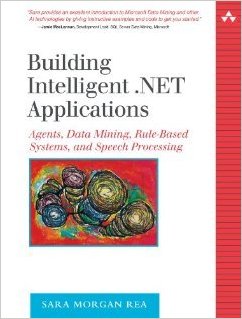
 saramorgan.net