Considerations when using Javascript in Visualforce

As part of my research for the new Lynda.com course I am doing on Visualforce, I have been going through posts on the Salesforce forums. I ran across this one in which the poster was asking what was the best way to select multiple checkboxes on a Visualforce page when a “Check All” checkbox was selected.

The best answer that was chosen was a recommendation by someone to use the ActionSupport component. The accepted responder even provided sample code. While the response was technically correct, I did not think it was the best solution. The reason I say this is because if you execute the sample code provided, you will note that there is a significant delay between the time you select the “Check All” checkbox and the time the other checkboxes are selected.

What causes the delay?

The ActionSupport component, which adds AJAX support to another component, allows that component to be refreshed asynchronously. While you might first think, “Asynchronous, that executes on the client and that is good and fast, right?”, that is not really the case. You see, when you use ActionSupport, or ActionFunction, or any of the action tags, you are essentially invoking server-side logic that is contained in your controller. This means that the AJAX request includes the pages view state and this can affect performance, as it did in the very simple example from this post.

So why use these controls?

Well, they are much easier to use than some of the other alternatives (which you can read more about here) and typically result in less code. But, if you are a good software developer, then you should not just blindly accept the path of least resistance. The other alternatives (namely Visualforce Remoting) will certainly perform better, but then they do require more code to be written. There is always a trade off, you see.

So, what is the best solution for this problem?

Well, I know you are going to be annoyed when I say this, but the answer is, “it depends”.

You could say the best alternative is one that was suggested by another responder on this post. That responders suggestion to use client-side JSJavascript (such as is provided in this post) was not accepted as the solution, but if you execute the code provided it does execute extremely fast. The difference in performance between the two suggestions is day and night (IMHO). But, this requires you to write and maintain the extra Javascript code.

If you are just sold on the whole, “it is better to use the built-in Action components provided by Visualforce because they simplify the code”, then you might want to consider adding an ActionStatus component right below the ActionSupport component. This is used to provide a message to the user telling them when the process starts and ends. That would prevent the user from just sitting there dumfounded for 1 – 3 seconds while the code was executing.

You might also want to consider using some of the other Javascript alternatives suggested in this excellent Developer Relations post on Using Javascript with Force.com.

You see, it really all depends on what you are trying to accomplish and what skills you already have. If you are blessed to have the time to consider other options, then I suggest you do so. There are often many ways to accomplish the same thing and rarely is one way always the best way.

 

HUGE Backlog for Registration of the Advanced Developer Programming Assignment

AdvancedDevCertBad news for anyone pursuing the Advanced Developer Certification. There is such a huge backlog, that I was just informed that I will not be able to register for the June, 2014 programming assignment as I had been expecting. Because of the backlog, I will now not be able to register until September, 2014. That sucks and I wanted to share this with you all.

According to Salesforce the following schedule now applies:

  • Candidates who completed the multiple-choice exam prior to December 1, 2013 and have not yet attempted the programming assignment and essay exam will be invited to participate in June, 2014.
  •  Candidates who completed the multiple-choice exam prior to April 1, 2014 and have not yet attempted the programming assignment and essay exam will be invited to participate in September, 2014.
  • Candidates who completed the multiple-choice exam after April 1, 2014 and have not yet attempted the programming assignment and essay exam will be invited to participate in December, 2014.
  • Candidates who have previously attempted the programming assignment will be invited to register for the programming assignment and essay exam in December, 2014, or in earlier windows as capacity is available.

For anyone stressing out about getting through with their multiple choice exam, you might want to factor this news into your preparation.

Sorry to be the bearer of such bad news, but I guess this just goes to prove how valuable this certification is – Salesforce is overwhelmed by the number of people attempting it. Capacity is limited to only 200 people per round.

Career and Survival Strategies for Software Developers

QuestionsI just watched a Pluralsight course that I think EVERY software developer should watch. It is for developers brand new to the field, those that have been developing for only a few years, and those that have been developing for many years.

The course is general and non-technical, but is highly informative, extremely insightful, and remarkably hilarious.

The course is titled, “Career and Survival Strategies for Software Developers” by Dan Appleman. Dan talks honestly about the things that are important to every developer, but that are oddly hardly ever mentioned. Things like:

“How do I keep up with the latest technologies and not become obsolete?”

“How do I deal with all the professional politics that go along with being a developer?”

“How do I make the kind of money I need or want?”

So please take the time to watch this course and let me know what you think…

Back up your Phone Right NOW!!!!

Last Friday evening, I stopped at a local convenience store for just a few seconds. PhoneBackupTwenty minutes later, I reached towards my phone cradle to make a call and realized my phone was gone.

Stolen, you ask? It certainly appeared that way.

I acted quickly. I returned home and immediately called my carrier to report the phone as stolen. They issued a block that would prevent anyone from using the phone on another network.

The next day I called the carrier back to see what I could do to get a new phone. I was lost after all and was already feeling highly anxious. I am sure you would feel that way too.

The nice woman on the phone told me she could send another phone and then asked if I had a backup. I sheepishly replied, “No”. The shame is that I am a developer by profession. Of anyone out there, I should know better. Heck, I even spent two years working for a company whose main selling point was providing companies quality backups.

Yet here I was…up the proverbial creek – without a paddle, or a backup. Nope my last backup was done 6 months prior. 6 months! Outrageous!!!!

Now, fortunately this story does have a happy ending. 3  hours after I hung up the phone with my carrier, I returned to my car to clean it. Guess what? My phone was there. It had accidentally fallen out of the cradle and fell under the seat. It was there all the time. Never stolen. I was a VERY lucky girl.

I consider it all to be an omen and a reason for me to share this warning with others. Do not find yourself in the same unfortunate position. As technology professionals, we really should know better and we really should ensure that we do regular backups of our machines AND devices. Especially our devices. These days they tend to hold more valuable information than our computers.

So please, take the time to make that backup right now.

And also, don’t leave your phones in your car, even for a second.

Take Care,

Sara

Comparing the Force.com SOAP API to the New Salesforce Toolkit for .NET

Last week I sat in on a webinar titled, “Build Customer Centric Applications Using the Salesforce Toolkit for .NET“, presented Tools_ce2c5aby Wade Wegner and Richard Seroter. As a .NET developer, I was excited to see a new way of connecting Salesforce via .NET. But, I was REALLY excited when I heard that the new toolkit was open-source and provided native libraries that utilized the async and await model in .NET.

I instantly knew that this new method would provide a lightning fast, near real-time alternative for connecting to Salesforce. And, after a little effort putting together a benchmark application, I was able to prove it.

At first, I tried to create a web application using Visual Studio 2010 that would test both the Force.com SOAP API and the new Salesforce Toolkit for .NET. Unfortunately, since the new Salesforce toolkit depends on the Task object and the async and await keywords (which came about with .NET Framework 4.5), using Visual Studio 2010 was not an option.

So, I moved the code to a Visual Studio 2012 web application and added the new Salesforce Toolkit via NuGet Packet Manager (NOTE: that you will need to have NuGet client version 2.8.1 or above, so you may have to take an extra step of upgrading that as I did).

The test application was simple. For both tests, a connection to Salesforce was established and a new case was created. A StopWatch timer was used to measure the run time to the millisecond. The Results?

Well, you should not be surprised to learn that the async-based task using the new toolkit was so fast, it did not even register a single millisecond. That’s right, the time returned was 0.0.

Creating the case via the Force.com SOAP API took an average of 2.32 seconds. Now, you might think 2.32 seconds ain’t bad. But, that time will always vary and could be much longer depending on the process to perform, amount of data and connection speed. There is just no WAY a synchronous method will ever be able to compete with an asynchronous process in terms of processing speed. PERIOD!!!

Now, that also does not mean that the new toolkit does not have it’s issues to consider. Asynchronous processing by itself brings about all sorts of other considerations (such as more complexity), and the following lists some things to consider if you choose to move forward with using the new Salesforce Toolkit for .NET in your org:

  1. You will have to create a connected app in your Salesforce org and then reference the consumer secret and key it provides inside of your code. See this post by Richard Seroter for more on that.
  2. If you use the new toolkit with an ASP.NET page, you will need to do a few extra things, like add an Async=”true” attribute to your page tag and register the async task. Go here to find more information about how to use asynchronous methods in ASP.NET 4.5.
  3. You will have to create a class that defines the Salesforce object you are accessing. This is the most annoying part for me and something I would like to see addressed. With the Force.com SOAP API, you can reference these definitions through the Web Reference you create. You do not have to create them specifically. This means that the Salesforce Toolkit is loosely tied to your org and therefore does not respect any required fields when it comes to object creation. I actually experimented with using the Case reference from the SOAP API in my asynchronous call using the new toolkit, and got back an error when I tried to add a case with no ClosedDateSpecified. This error was not thrown back when I used my own custom class to define the minimal fields for a Case object.

As far as the code is concerned, the following is the code used to perform the test using the new Salesforce Toolkit for .NET:

public class Case
{
        public string Id { get; set; }
        public string Subject { get; set; }
        public string Description { get; set; }
        public string AccountId { get; set; }
        public string Priority { get; set; }
        public string Status { get; set; }
}

public partial class Test : System.Web.UI.Page
{
        public const String subject = "Test Case";
        public const String description = "testing";
        public const String accountId = "001d000001UsLAX";
        public const String priority = "Medium";
        public const String status = "New";
        public const String username = "your user name here";
        public const String password = "your password and security code here";
        public const String consumerKey = "your connected apps consumer key here";
        public const String consumerSecret = "your connected apps consumer secret here";

        protected void Page_Load(object sender, EventArgs e)
        {
            
        }
        protected void NewToolkit_Click(object sender, EventArgs e)
        {
            //Time how long it takes 
            Stopwatch sp = new Stopwatch();
            sp.Start();
            RegisterAsyncTask(new PageAsyncTask(TestToolkit));
            sp.Stop();
            TimeSpan ts = sp.Elapsed;
            //Display the Results of timer
            lblResults.Text = "Runtime: "
                + String.Format("{0:00}:{1:00}:{2:00}.{3:00}",
                    ts.Hours, ts.Minutes,
                    ts.Seconds, ts.Milliseconds / 10);
        }
        
        async Task TestToolkit()
        {
            
            //create a connection and get a token to create a new client
            var auth = new AuthenticationClient();
            await auth.UsernamePasswordAsync(consumerKey, consumerSecret, username, password);
            var instanceUrl = auth.InstanceUrl;
            var accessToken = auth.AccessToken;
            var apiVersion = auth.ApiVersion;
            var client = new ForceClient(instanceUrl, accessToken, apiVersion);

            Case sfCase = new Case()
            {
                Subject = subject,
                Description = description,
                AccountId = accountId,
                Priority = priority,
                Status = status
            };

            string Id = await client.CreateAsync("Case", sfCase);
            lblMessage.Text = "The following case was saved sucessfully: " + Id;

        }
}

Approved as a new Lynda.com Author

lynda_logo1k-d_72x72I just got word that I have been approved to be a new Lynda.com author! They want me to design a series of courses on Salesforce development. They currently have none, so this is very exciting. One of the things I really like about Lynda.com is their commitment to high-quality productions. They are leaders in the area of online video training.

The first course will likely be very introductory (such as “Up and Running with Visualforce Development”).  If you have suggestions for areas you think I should cover, I would love to hear from you. Feel free to comment to this post or to send me a message directly though my contact form.

I will be sure and announce when the course is approved and of course, when it is released. Until then, please send me your thoughts.

Finally Passed the Advanced Developer Multiple Choice Exam!!!

This is no April’s Fool joke. Yesterday, I finally passed the Salesforce Advanced Developer Multiple choice exam!!! It was my second attempt. The first attempt was 6 months ago, but I now know that I was not ready then, so it was a good thing that I did not pass.

Back then, I barely knew the material. I thought I knew it because I had memorized it, but that did not mean that I “understood it”. I am now happy to say that I “know” this stuff. I know it like I know the back of my hand. And, that is a VERY good thing, because I now wait to complete the next stage of the process…the dreaded programming assignment.

Unfortunately, I have to wait until the next limited registration period (which is not until June 2). But, I am confident that the skills I have acquired so far will not atrophy before then. If anything, they will just continue to improve.

So, how did I learn this stuff like the back of my hand? I did it by following EVERY suggestion on Forceprepare. I basically did all of the following:

  • Obviously, I memorized all the notes I have posted on this site (but that was just the beginning and was not enough by itself to pass)
  • I watched the entire re-broadcast of the 501 Dev Class (which I posted about here). I took additional notes from that and posted them to this site (still not enough to pass). UPDATE, sorry to say but Salesforce has since removed the re-broadcast links from the 501 class.
  • I watched all of the 8 training videos on Pluralsight (which I posted about here)
  • I watched at least a dozen or more videos from Dreamforce.
  • I read countless blog articles from experts like Jeff Douglas, Matt Lacey, Bob Buzzard, etc
  • I worked through all the code in Bob Buzzards latest book, The Visualforce Development Cookbook (which I reviewed here).
  • I worked through ALL the Workbooks on DeveloperForce (they have been updated recently and they are REALLY GOOD).
  • I read through the entire Developers Guide (and YES, I know it is LONG).
  • The MOST important thing: I played with all the code on my Developer org (which is now packed with best practice code examples).

When I took the test yesterday, it was so easy to me. I could see through all the tricks they had put in. It seemed really obvious to me (which I think will make the programming assignment phase a breeze). Bring it on, I say. I just wish I could do it sooner.

How to Run the Sample Ruby on Rails Force.com Canvas App Using Windows

First off, I am a big fan of Jeff Douglas and all that he has done for the Salesforce community. I am constantly getting really useful stuff from his blog. That was why I was so excited to see a post he did this month about getting a sample Ruby on Rails Force.com Canvas App.

I have been playing with Ruby, Node.js, and Heroku for several weeks now, so this seemed like a great thing for me to install and check out. The problem was that I ran into quite a few issues while trying to get the app working (primarily because I am trying to do all this on a Windows machine/command line) and not a Linux or OSX shell (as Jeff was obviously using).

This post is all about the problems I ran into and what you can do to avoid them if you are trying to run this on a Windows machine. So, if you want to install Jeff’s Sample Ruby on Rails app, first follow the great instructions on Jeff’s blog, which have you setup the connected app in your developer org.

For the next section about installing the rails-canvas app, if you are running all this on a Windows machine, you will want to consider the following when completing that section:

  • You will need to already have Ruby running on your machine. But, you will specifically need to be running an older version of it in order to get this particular tutorial to work. I already had the newest version of Ruby (2.0) running on my machine, but I found out that it would not work until I used a particular older version (1.9.3) that is deemed more stable (especially on Windows, and even more specifically on a Windows 64bit machine, as I am using). Specifically, I was not able to start the rails server, without getting an error with the eventmachine. I imagine, you might be able to get around this eventually (even though I tried several things), but I think the easiest way is to just use the more stable version of Ruby.
  • To install Ruby on Windows, go to the RubyInstaller web site and download the Ruby 1.9.3-p545 version specifically. If you already have the latest version of Ruby running on your machine, you will either need to uninstall that version or use a Ruby version manager tool (such as rvm for Linux or Pik for Windows) to specify that you need to be running the older version of Ruby.
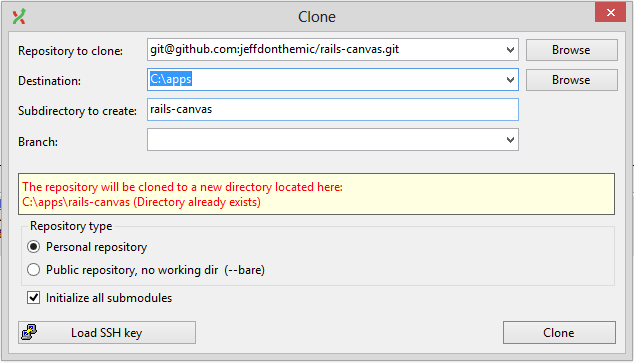
  • If you do not already have Git (which is an open source code versioning application) installed on your Windows machine, you will need to install this first in order to get the source code required for this demo. To do that on a Windows machine, you will want to go to the GitHub page to download the installer for the msysGit project. I would also recommend installing GitExtensions for Windows, as it makes it much easier (via a GUI) to clone (aka, copy) GitHub projects to a Windows machine.GitRailsClone
  • Once Git is installed, you will need to use either GitBash (which is installed on your Desktop by default with msysGit) or GitExtensions (as seen in the picture on the right) to clone the sample code that Jeff has provided on GitHub.
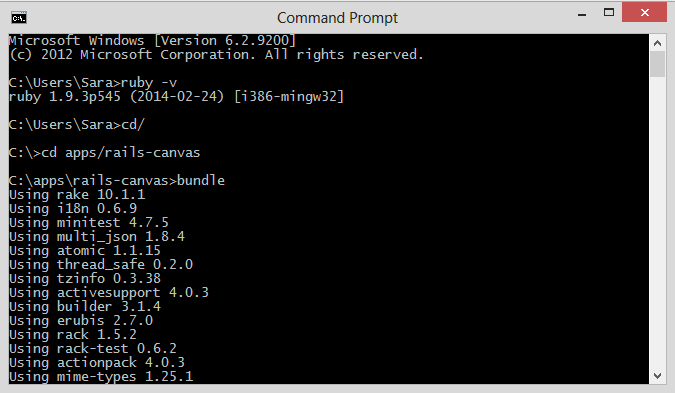
  • Once the project is cloned to your local machine, you will need to open a command prompt and change directories to the directory where your project files are located. You will then need to bundle the project (which will install any of the gems this project requires). This is done by issuing the following commands from the command prompt (as seen in the image below).
cd/
cd apps/rails-canvas
bundle

BundleRailsProject

  • You will now need to return to Jeff’s post and follow the instructions to get the Consumer Secret for your connected app. Once you have this secret number, you will need to add it as an environment variable. In Windows, this is done using the Set command from the command window. Jeff’s post refers to the export command, but this is specific to the Linux environment. In Windows, you will just change the command to be “set” instead of “export”, and “YOUR_SECRET” will be the numeric code you retrieve from Salesforce, such as the following:
set CLIENT_SECRET=YOUR-SECRET
  • Now this step is something Jeff’s post does not refer to, but is VERY important if you want to get this tutorial to work. If you were to proceed at this point with Jeff’s instructions, you could start the server, tunnel through port 443 to 3000 and even start your Canvas app, but you would probably get a connection failed error in your browser. The error is caused by the fact that the OpenSSL library that Rails installer uses has no certificate authorities defined by default. Yes, you “could” get around this by changing a line of code in the Gemfile to use http and not https, but that would defeat the whole purpose of this tutorial, since Canvas requires https. So, to fix this, you will need to download a certificate (cacert.pem) and install it on your local machine. Follow the steps in this GitHub Gist post to do that. I imagine Jeff did not mention this because he has been working with this stuff for so long, he probably installed a cert file on his machine two years ago.
  • You will then need to start the Rails server, which you can do from the Windows command prompt. You do this by entering “rails s” or “rails server” from the command prompt.TunnelsUsingCommandprompt
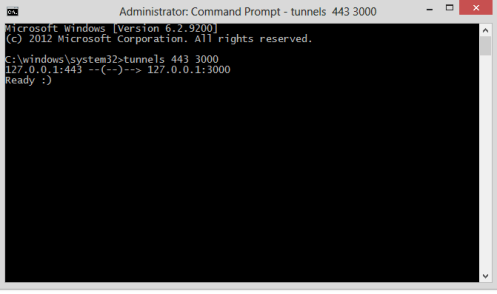
  • Jeff’s post instructs you to use sudo to run the tunnels command, but this is a linux command and will mean nothing to you Windows users. Alternatively, you will need to fire up another instance of the Windows Command Prompt, but do so by right-clicking on the app and selecting, “Run as Administrator”. This essentially does the same thing that the sudo command does. From there just enter “tunnels 443 300” (as I did in the screenshot on the right).
  • From there, you will want to open your browser and go to the https:/localhost/canvas page and click the “Understand the Risks” button that you should be presented with.
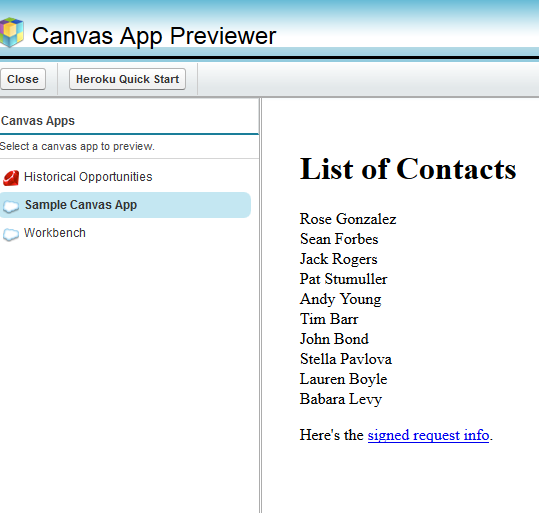
  • Finally, you can go back to Salesforce and browse to your Sample Canvas app (either using the Chatter tab) or by going to the Canvas App Previewer (as seen below).

RailsCanvasApp

Now, I realize with all these steps, you might be thinking, “Why the Heck bother?” I hear ya!

But, there is something very powerful in understanding how to do all this. Salesforce and the Force.com platform will only be powerful if you are able to interact with it as seamlessly as possible and Canvas apps offer a GREAT way to do this. I hope you are able to get it working using the steps in this post and you do not waste two days (as I did). 🙂

Good Luck…


Motivation and Tips for Passing the Force.com Advanced Developer Certification

AdvancedDeveloperCertVideoIf you are currently pursuing or even just thinking about pursuing the Force.com Advanced Developer Certification, I strongly suggest you check out this video. It is a recording of a panel discussion held at the most recent Dreamforce (late 2013), in which 3 people (seen in the image on the left) who have recently passed the Advanced Developer Certification shared their personal stories.

All three of the speakers had very different backgrounds and experiences in which to share. They each explained why they chose to pursue the certification, as well as specifics about how they studied for the exam and prepared for the coding assignment.

I found the third speaker, Barry Hughes, tips to be particularly helpful, which included some of the following:

  • Prepare for the essay exam by keeping notes and commenting your code as you complete the programming assignment.
  • When doing the programming assignment, focus on the functionality and not the visuals or the security
  • Make sure when you do your unit tests, that they include tests for positive, negative, bulk and specific profile scenarios.
  • Schedule the essay exam when you have the development for the programming assignment nearly finished. You do not have to wait until after you submit it.
  • When taking the actual essay exam, DO NOT try to copy and paste answers from one section to another. If you do, the testing software will deliberately erase what you typed and you will have to re-type it all (or madly find a proctor to get it back, as Barry ended up doing).

All of the panelists seemed to agree on the following advice:

  • Practice as much as possible by going through all of the workbooks available to you on DeveloperForce.
  • Take as much time as you can for the programming assignment and start as soon as you receive it. You will only have 4 weeks to complete. It took the panelists an average of 40 – 80 hours to complete the programming assignment and all had to do it in addition to their regular jobs.
  • Focus heavily on creating good test code for your programming assignment.

If you have not already run across this document about the Road to Advanced Developer Certification, I strongly suggest you read it too.

Add Audio/Video Conferencing to Any Visualforce Page with GoInstant

GoInstantlogo-174x174It is very likely you missed the announcement less than two years ago about Salesforce acquiring a Canadian-based company named GoInstant. It is also likely that even if you attended Dreamforce in late 2013, you missed a very informative session titled, “Build Real-time Multi-User Apps with Visualforce, GoInstant and AngularJS“.

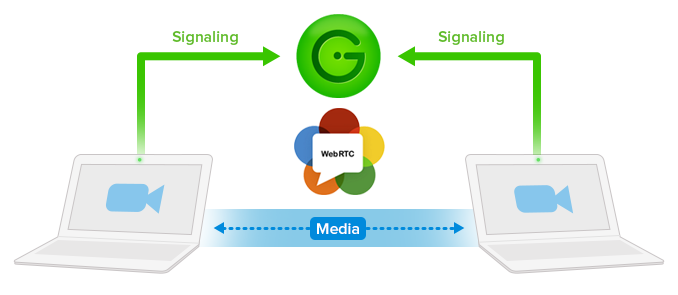
From what I can tell, not much fuss has been made so far about the Backend-as-a-Service provider that was founded in 2010 and acquired by Salesforce in 2012. I imagine that is mostly because up until a few weeks ago, there was not much you could do with GoInstant, other than add chatting capabilities (Hello, Salesforce already has Chatter).  But, with the recent integration with WebRTC (or Web Real-Time Communication), we may be seeing a lot more possibilities popping up.

GoInstant recently released a WebRTC-based widget that lets you EASILY add Audio/Video conferencing capabilities to any Visualforce page. No back-end servers required! And, it is completely free for the first 1000 monthly active users!!!

GoInstant handles all the complexities involved with offering this type of functionality. They handle security, data synchronization and storage, and even scalability. The WebRTC widget specifically lets you initiate, pause, and mute a video stream, all with a single click. And no need for the client to download anything (YEAH). It’s kind of like being able to offer the ease and power of Skype within a secure Salesforce connection.

webrtc-plus-goinstantI can see this type of functionality being really useful for customer support situations, but I can also see it being heavily used in the Enterprise for internal communications. Now, even small to medium companies can offer the type of audio/video chatting once only available to the really BIG enterprises. In fact, I imagine, even the big Enterprises will want to consider dumping their expensive and hard to maintain Unified Communications systems for something like this.

One Gotcha to consider is that currently, WebRTC is only supported in the latest versions of Firefox and Chrome (but I expect the list of supported browsers to be growing very soon). Another thing to consider is that there has still been no final decision made about what standard video codec will be used. (but again, I am sure this will be resolved soon enough).

If you want to see how this works right away, check out this demo created by the clever folks at GoInstant. And, if you want to start playing with this type of functionality in your developer org, I would recommend you check out this GREAT post on Developer Force about how to use the widget in a Visualforce page.