Why Lightning Base Components are so Awesome

When Lightning development was first introduced, the Salesforce developers thought UI components (which you have probably seen used in a lot of sample code) would meet all the needs of component developers. They were wrong. Although the UI components, which include things like ui:inputText/ui:outputText, ui:button, ui:menu, ui:message are very useful, they have some serious drawbacks.

The biggest drawback is that they do not handle validation for you automatically. The component developer is responsible for adding JavaScript code needed to validate data entered into these components. Another big drawback with UI components is that they do not handle Salesforce Lightning Design System (SLDS) styling for you. You have to know which SLDS tags to use around your UI components.

To understand exactly what this means, consider a “very simple” component used only for creating new cases. This is what the component looks like when rendered:
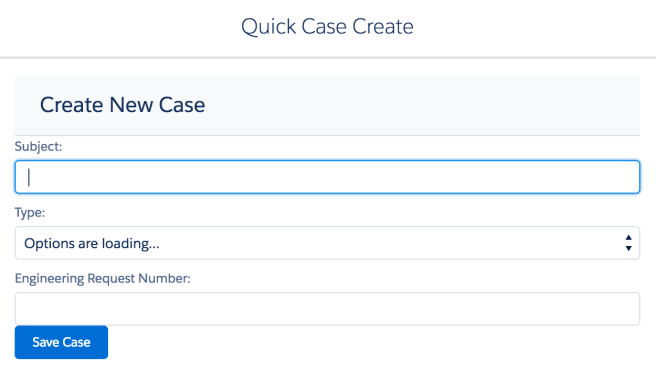
Screen Shot 2017-03-03 at 2.51.39 PM.png

Using UI components, this is how much code is needed to validate this very simple component:

validateForm: function(component) {
  var validCase = true;
  var subjectField = component.find("Subject");
  if($A.util.isEmpty(subjectField.get("v.value"))) {
     validCase = false;
     subjectField.set("v.errors", [{message:"Subject can't be blank"}]);
   }
   else {
     subjectField.set("v.errors", null);
   }
   var reqNumberField = component.find("EngineeringReqNumber");
   if($A.util.isEmpty(reqNumberField.get("v.value"))) {
     validCase = false;
     reqNumberField.set("v.errors", [{message:"EngineeringReqNumber can't be blank"}]);
   }
   else {
     reqNumberField.set("v.errors", null);
   }
  // Verify we have a contact to attach it to
   var contact = component.get("v.contact");
   if($A.util.isEmpty(contact)) {
     validCase = false;
     console.log("Quick action context doesn't have a valid contact.");
   }
   return(validCase);
 }

In addition to having to add your own validation code to the JavaScript controller, you will have to know which SLDS (or Salesforce Lightning Design System) tags to use and this is not always so obvious.

Most developers I know do not want to have to spend the time learning which CSS tags to apply to get the styling they need. They just want things to work. Out of the box. Simple like.

I hear ya and so did the developers at Salesforce.

In Winter 17, Salesforce released a whole new set of components known as Base Lightning Components. Similar to the UI components, these components do something fundamentally different. The validation code and SLDS styling is built right in. All you have to do is add the markup to your page and waaaalaaa!

The page will render the same with styling and will have built-in validation, but the code will be so much simpler.

If you have not checked out the Base Lightning Components, you might also want to check out my new course on Pluralsight, which has an entire module about Base Lightning Components.

Hello Lightning Data Service

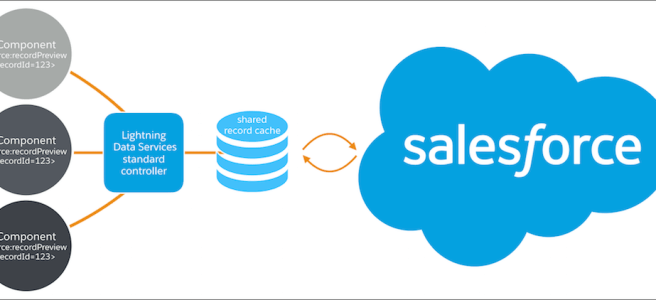
The Winter 17 Salesforce release introduced a lot of exciting new changes for Lightning Component Developers. One of the most significant, was the release of the Lightning Data Service (LDS).

The LDS is “kind of” like the standard Visualforce controller, but for Lightning components. Even after the Spring 17 release, it remains in developer preview. This means you cannot use it for Production apps  and it will likely change names before it’s release. However, this represents the direction of where Lightning development is headed in terms of making it easier on the developer. Expect to see more things like this.

The LDS can be really cool if you are putting together a really simple component that will just access a single sObject and do some CRUD with it. The biggest benefit with using the LDS is that you do not need to use Apex code (think no unit tests). And most importantly, you do not have to include CRUD access checks in that code. You also get great performance benefits because components using the LDS all share a highly efficient local storage, so they should run faster.

Unfortunately, most of the Lightning component samples out there do not include Apex code to check for CRUD and FLS permissions and this is a big mistake because for Lightning components, this is not automatically enforced. CRUD and FLS security was automatically enforced in Visualforce pages, so most Salesforce developers will not even think about adding these checks. But in the world of Lightning, if you are using Apex code, you need to add access checks. Period!!!!

If you have no idea what I am even talking about, take a look at this sample Apex code, which includes the necessary access checks:

public with sharing class MyController {
  @AuraEnabled
  public static List getAccounts() {
    String [] accountAccessFields = new String [] {'Id',
      'Name',
      'AccountNumber',
      'AccountRevenue',
      'CreatedDate'
    };
    // Obtain the field name/token map for the Account object
    Map<String,Schema.SObjectField> m = Schema.SObjectType.Account.fields.getMap();

    for (String fieldToCheck : accountAccessFields) {

        // Check if the user has access to view field
        if (!m.get(fieldToCheck).getDescribe().isAccessible()) {

            // Pass error to client
            throw new System.NoAccessException()

            // Suppress editor logs
            return null;
         }
     }

     // Query the object safely. This is the only code you will see in most 
     // Lightning code samples that do not include the access checks
     return [SELECT Id, Name, AccountNumber, AccountRevenue, CreatedDate 
              FROM Account];
  }
}

By using the LDS, you avoid having to include ALL of this apex code and you still get a secure Lightning component. See now why using the LDS is so cool?

Now, I have to be honest and tell you that using LDS is not all unicorns and rainbows. It has some serious limitations (besides the fact that it is still in developer preview) such as:

  • Only works with a single record and does not support operations that need to go against multiple sObjects
  • Cannot be used to perform queries using anything other than the recordID.
  • Even after it is released, it will probably not work in Communities, Lightning Out or Lightning Components for Visualforce

Despite these limitations, I still think the LDS is cool and that it’s introduction indicates more good things to come. I hope you take the time to check it out.

Trailheads New Data Integration Specialist Superbadge is Super Fun!

trailhead_superbadge_data_integrationI recently had the fortunate opportunity to provide early testing and feedback for the latest Superbadge released by Salesforce’s Trailhead. This one covers all the different aspects of being a data integration specialist. This includes being able to configure both inbound and outbound security, being able to synchronize Salesforce data with external systems, and creating test Apex classes to do both Apex REST and SOAP callouts.

Even though I have done quite a bit of data integration work over the years (both with Salesforce and .NET), I admittedly had not done much with it in the past two years, so I figured this might be a bit of a challenge.

It sure was a challenge, but in a very good way I think. And, it was actually fun! Yeah, right, fun I said.

The superbadge is not like any of the other trailheads you may have completed in the past. This special superbadge is designed to test how well you really grasped the underlying material and not just walk you through yet another predictable tutorial. It is also based on real-world type scenarios, similar to what you would encounter in your development job.

This particular superbadge requires that you to complete 4 other Trailhead badges as pre-requisites before you can even attempt the badge. The other badges will give you the knowledge that you need, but the challenges in the superbadge will only offer you business requirements. You will be asked to complete 9 different challenges that will really confirm you know the material well. You will even be asked to apply best practices when applicable.

What is so fun about it, is that it forces you to think though the scenarios and not just repeat a bunch of steps. If you are a developer like me, then you actually like this type of challenge, You probably also like crossword puzzles and mind teasers too, I’m guessing

So, I challenge anyone with no to a lot of experience with Salesforce data integration to check out this newly available superbadge and let me know what you think. I bet you will love it just as much as I did.

Top 5 Lightning Tips for Visualforce Devs

#1- Transition does not have to be all or nothing

For Visualforce Developers, when it comes to transitioning to Lightning development, it does not have to be an all or nothing deal. Very few development shops/companies will go from doing all Visualforce development to doing all Lightning development overnight. That is just not realistic, nor a good idea, in my opinion.

The introduction of Lightning Out offered a lot of options for Visualforce developers wanting to slowly transition to Lightning. If you want to learn what options are available in terms of a transition plan, I suggest checking out this post and blog series by Salesforce Architect, Mike Topalovich. Mike does an excellent job, not only of giving a lot of background, but of detailing 5 specific migration paths that you will want to consider.

#2 – Watch your Casing

JavaScript is Case sensitive!!!

This is so important, I am going to write it again, “JAVASCRIPT IS CASE SENSITIVE”.

If only I had a nickle for every time I ended up discovering that the odd error I was getting in Lightning was actually caused by a casing error of mine. Seriously, I cannot tell you how many times this has tripped me up. More times than I would probably like to admit.

So anytime you are working with Lightning and you get an error that makes no sense, the first thing you should do is return to your JavaScript code and make sure you did not make a casing error. It really is VERY easy to do. Embarrassingly so.

#3- Security Works Differently

As Visualforce developers, you have been spoiled as far as security is concerned. Visualforce apps operate out of the Force.com domain, which is not shared with Salesforce code. But, Lightning apps and components run in a special domain that is shared with Salesforce-authored Lightning code.

This means that the security for Lightning components are subject to a Content Security Policy (CSP). The rules surrounding what is and what is not allowed with these components will just tighten as time goes on. Go here to learn more about all the concerns regarding Lightning Security.

One important thing that you need to know is that any of your AuraEnabled Apex classes must do an explicit check for CRUD and FLS permissions. This was handled automatically for you in Visualforce pages, but in Lightning, unless you are using the new Lightning Data Service, you will need to do this check manually. You can do so using the isAccessible(), isCreateable(), isDeleteable(), and isUpdateable() methods. You can learn more about how this is done here.

#4 – Install and Use the Lightning Inspector

For Chrome users, there is an excellent plug-in called Lightning Inspector that every Lightning developer should check out. One of the most useful features it offers is a component tree tab, which shows you how the Lightning Framework sees your component. You can use this as a tool not only for debugging components, but learning more about what some of the built-in ones are capable of.

#5 – Check out newest components/features added

The Lightning Framework has been out for a while now (over 2 years actually) and in that time there have been many new releases and lots of new features added. Building Lightning components today is not the same as it was when you may have run through a tutorial or article a year or two ago. If it has been a while since you took a look at what features and components are available, it is time to take another look.

In the last release (Winter 17) many new features were added such as the Lightning Data Service, which you can kind of think of as the equivalent of a Standard Controller for a Visualforce page. Currently this feature is still in developer preview, but using it allows you to eliminate the need for Apex code and also those manual security checks that I mentioned earlier.

I strongly believe that component-based development, such as what you do with the Lightning Framework is the future of web and device-based development. If you have not already dipped your toes in Lightning Development, it is not too late. Things are just getting really good for this modern development platform.

Natural Language Processing for JavaScript…Seriously

nlp.pngI would highly recommend anyone interested at all in Natural Language Processing (NLP) check out this newly released free course from the great folks at EggHead.io titled, “Natural Language Processing in Node.js“.

This short, but sweet course by programmer/artist Hannah Davis is based on work she did on a project to translate literature into music. The project, named TransProse would read in text using the natural library, which is available as open source here.

Hannah’s course gets straight to the point and shows you very quickly how you can start parsing text using the natural library and then do all sorts of things with it such as locating similar words, tagging parts of speech, and even classifying text into categories with machine learning.

The entire course takes only 38 minutes to watch. 

Come on. You can take the time to watch it.

But hurry, because it is only free until December 19th, as part of several courses Egghead.io is relasing for it’s 10 days of Giftmas.


AI for Everyone? Kind of

Recently, Salesforce started a campaign concerning their latest product offering, Einstein. This einsteinplane1campaign promises, “AI for Everyone”.
That is quite a claim and Salesforce is certainly not the first to make it. As a self-proclaimed AI Enthusiast/junkie, I can say that I have seen this type of claim before. However, this is the first time that I think it might actually be somewhat possible. At least as far as a specific area of AI known as deep learning is concerned. And, also if were talking about relating this just to Salesforce in particular.

So, does this mean that soon everyone will have personal robot butlers?

Absolutely not. We are not even beginning to talk about robotics here. Nor some other areas that fall under the rather large AI umbrella.

So what can Salesforce customers do with Einstein?

Well that will certainly change as the product evolves, but right now the most relevant thing you can do with it is to utilize the Predictive Vision Service (PVS). This can be used to classify images into categories using supervised learning and very specifically optimized machine learning algorithms. These algorithms were developed by a company called MetaMind, which was last year aquired by Salesforce and since then they have been working feverishly to offer their services on the Force.com platform.

If you are interested in learning more about how this works, check out the docs here or this recently released webinar, which does a very good job of laying out what is currently possible with the PVS.

Note that currently Salesforce is not offering a service that does Natural Language Processing (NLP).  But, I am sure that will be the next big thing Salesforce customers will be demanding. NLP is a huge field and one that has been around for many years, but with varying levels of success.  The most difficult challenge I suspect will come from the fact that the product will need to support several languages beyond English to be considered useful. It will also need to be able to handle untrained users with a high degree of accuracy, which is a very tall order to fill.

It appears to me that the majority of Einstein’s capabilities will be “Baked in” to many of Salesforce’s products and their use should be seamless to users. They will also be very specific to Salesforce CRM.

The most important thing to understand is that Einstein is NOT a general purpose AI engine. As enthusiastic as the Salesforce Marketing team obviously is, Salesforce has not reinvented the wheel and certainly not developed some new and unheard form of AI that will corner the market.

BUT, they have started to offer some very useful API’s that can be used to implement specific areas of AI that were once only accessible to the elite of AI researchers.

And the most promising news was just announced this month when a group from Salesforce Research created a neural network named the Dynamic Coattention Network and that model was the first to break the 80% mark when tested against the Stanford Question Answering Dataset. And for those of you that just said to yourselves, “and why should I care about that?”.

Well, ever since Stanford released their dataset, which now consists of questions posed by crowdworkers on a set of Wikipedia articles, lots of top AI researchers (including Microsoft, Google and IBM) have been racing to create models that will reach this golden threshold, but Salesforce was the first to reach it. It’s kind of a big deal.

I look forward to the next few years and seeing all the new services that will be added to the platform, bringing about the Enhanced Computing world I always envisioned.

Passed the Salesforce Platform Developer I and II Transition Exam!!!

Woo Hoo!!!!

I am VERY happy to announce that yesterday I passed the Salesforce Platform Developer I and II transition exam. This exam is offered to Advanced Developers that want to take an easy path to getting their Platform Developer certs.

But, that does not mean this test is easy. The questions are scenario based (as you would expect) and do not test whether you memorized the material, but rather whether you “know” it like the back of you hand.

There are only 16 questions and you have 30 minutes to complete the test. That makes it a bit nerve racking in my opinion.

The official study guide lists the main areas you need to focus on for the test and I would say that is a pretty good start. The list consists of the following:

According to Official Study Guide

  • Describe the capabilities of base-system objects such as sharing objects, history objects, metadata objects, multi-currency, and Chatter objects.  
  • Describe the different capabilities of and use cases for the various Salesforce development platforms (Heroku, Fuel, Force.com).  
  • Describe how to design code that accommodates multi-language, multi-currency, multi-locale considerations.  
  • Describe the implications of compound data types in Apex programming.  
  • Describe the interactions between Visualforce/Apex with Flow/Lightning Process Builder.  
  • Given a scenario, describe when and how to use Apex managed sharing.  
  • Describe the use cases for the various authentication techniques.  
  • Given a set of requirements, describe the process for designing Lightning components.  
  • Describe the common performance issues for user interfaces and the techniques to mitigate them.  
  • Describe how to expose Apex classes as SOAP and REST web services.  
  • Describe how to use system classes to integrate with SOAP- or REST-based web services.  
  • Describe when and how to use metadata, streaming, and Analytics API to enhance Apex and Visualforce solutions.  
  • Given a scenario, identify the appropriate tool to analyze application performance profiles and troubleshoot data and performance issues.

I would add to this list some other areas that I suggest you also concentrate on:

  • @InvocableMethod and @InvocableVariable versus ProcessPlugin interface
  • Querying the PermissionSet
  • Using Developer Console to debug an app (especially checkpoints)
  • Using Webservice keyword and considerations
  • Querying based on the Currency field 
  • How to register certificates
  • Apex Managed Sharing considerations

Just to give you an idea, I spent about 3 weeks and over 20 hours studying for the exam. Even though I work with Salesforce development everyday, the exam does cover topics that I do not necessarily deal with on a daily basis, so I would suggest you spend some time reviewing the topics listed above.

Good luck on the test and let me know how you did.

screen-shot-2016-09-25-at-10-49-38-am

Winter 17: Replacing JavaScript Buttons With Lightning Actions

Winter 17 hasJS introduced a whole bunch of new enhancements for Lightning and I will be blogging about a lot of them in the next few weeks, but one of my favorites is the new Lightning Actions that provide the ability to replace all those JavaScript buttons you may have littered about your org.

Ok, now anyone that has an org with more than one JavaScript button, just read that last statementdreamstime_xl_25648715 and probably thought, “Say what? I have to replace JavaScript buttons with something new? What about just migrating the existing buttons to Lightning?”

Can’t do it.

Why? Well, in three words, “Big Security Concerns

Yep. the kind that can bring an org to it’s knees and one that also can’t be resolved by providing some simple migration tool that converts existing buttons into Lightning actions automagically.

The bad news here is that you are going to have to do some real work to get all those buttons converted into Lightning actions. But, the good news is that once you do it, you will probably be very happy that you did and your org will certainly be more secure as a result.

And to help you get to that point, the Salesforce development group has started a new blog series titled, “JavaScript Buttons, Lightning and You“. This three part series will step you through what you need to know to move towards Lightning Actions. I also plan to cover this very topic as part of the new Lightning course I am working on (more on that later).

So, take some time to check out the new blog series and learn why you might be better off starting your transition to Lightning by first converting all those buttons to actions.

And stay tuned for more info about my upcoming Pluralsight course.


Do this Salesforce Security Scan NOW!!!

Screen Shot 2016-08-20 at 11.39.10 AMPrior to about a week ago, if you went to this page and requested a Force.com Security Source Code Scan, you would have most likely gotten an error telling you that it could not be done and that you would need to submit a case.

Luckily, Salesforce has resolved this issue and you can now simply go to the link above, enter your credentials and you will be able to scan your org for security and quality rules. The scan will take a while to run (as in several hours or even days perhaps), but I promise it is worth the wait.

What you will get back is a very thorough report that scans your entire codebase for not only security issues (of which I am sure you will be amazed by how many critical violations it will find) but it will also evaluate whether you are utilizing best practices in your code to ensure good quality.

For example, it will scan your code to tell you where you have code that does the following:

  • Queries With No Where Or Limit Clause
  • Multiple Trigger On same sObject
  • Hardcoded Ids
  • DML Statements Inside Loops
  • SOSL SOQL Statements Inside Loops
  • Async Future Method Inside Loops
  • Test Methods With No Assert
  • Need to Bulkify Apex Methods Using Collections In Methods

I think everyone should take the time to have their orgs scanned and review the results. I suspect that even the most diligent of development shops will find some issue that needs to be addressed.

Happy Scanning.

Free Videos from Improving Visualforce Performance Online Course

I just found out I can embed videos from my course for Lynda.com about Improving Visualforce Performance. So, I thought I would do a post and embed the free videos for that course.
https://www.lynda.com/player/embed/428848?fs=3&w=560&h=315&ps=paused&utm_medium=referral&utm_source=embed+video&utm_campaign=ldc-website&utm_content=vid-428848

https://www.lynda.com/player/embed/428871?fs=3&w=560&h=315&ps=paused&utm_medium=referral&utm_source=embed+video&utm_campaign=ldc-website&utm_content=vid-428871