Lightning Best Practice: Storable Actions

File_Server_Cache_Blue

Storable Actions are a GREAT way to enhance the performance of your Lightning components and implementing them is incredibly easy, but there is one big gotcha to seeing them work with a stand-alone Lightning Application.

Even though storable actions are automatically configured in Lightning Experience and Salesforce1, any Stand-alone Lightning apps that are used to host your components will NOT use caching by default.

For these apps to use storable actions, you must do these two things:

1.) Add a new component which you can name whatever you want, but I named mine AppTemplateComponent and have it use the following code:

AppTemplateMarkup

2.) You then need to add the following attribute to the aura:application tag of your Lightning Standalone app:

template="c:AppTemplateComponent"

Once you do this, you should be able to see the caching working for any component used in that app that calls the following line of code:

action.setStorable();

Isn’t that amazing?

Just one line of code is all you need to add to start taking advantage of caching in your server-side actions. The impact on performance can be amazing and perhaps the best place to see is when it comes to rendering a list of data (especially if that data is non-mutable and therefore will not be updated).

This best practice really is a no brainer that everyone building Lightning Components should consider using.

If you found this article useful, you might want to checkout my latest course on Pluralsight titled, Lightning Component Development Best Practices, where I talk about storable actions and a lot more.

Lightning Best Practice: Adding Pagination to Lists

Pagination

What happens to a Lightning Component that displays a list of data without pagination?

It is probably doomed to suffer from performance problems and who wants to build a component that is doomed? Certainly not you, right?

It’s possible that Salesforce might release a pagination component at some point in the future, but until they do, you will need to roll out your own. Fortunately, it is not too terribly complicated and in this post I will walk you through how to do it.

To begin, I must give credit where credit is due and acknowledge that the paginator component I am using in this post is almost identical to the one used in the Dreamhouse application (which if you have not checked out, you really need to do so).

The markup code for the Paginator component is as follows:
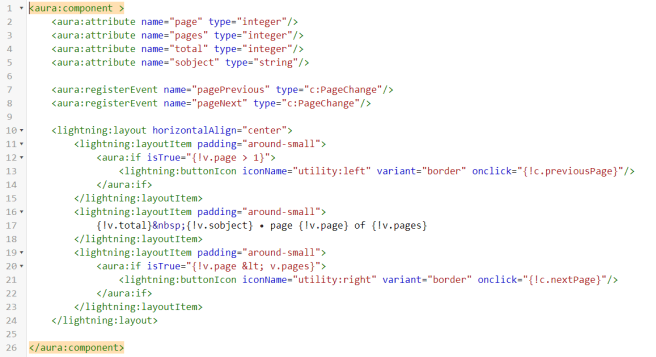
Paginator

And the Controller code looks like this:

({
	previousPage : function(component) {
        var pageChangeEvent = component.getEvent("pagePrevious");
        pageChangeEvent.fire();
	},
    
	nextPage : function(component) {
        var pageChangeEvent = component.getEvent("pageNext");
        pageChangeEvent.fire();
	}
})

Additionally, I use a component event called PageChange which looks like this:

PageChange
Ok, so I have a component that currently renders a list of race data. To make it work with the paginator component through, I will have to make a few changes to both the markup,  controller and helper, along with the Apex Controller it references.

The new version of the markup looks like this:

NewListRacesMarkup

The Modified controller (seen below) now includes two new actions named onPagePrevious and onPageNext and these are referenced in the Paginator component.

({
    doInit : function(component, event, helper) {
	helper.getRaces(component);
    },
    handleAddToRaces : function(component, event, helper) {
        helper.addToRaces(component, event);
    },
    onPagePrevious: function(component, event, helper) {
	var page = component.get("v.page") || 1;
        page = page - 1;
        helper.getRaces(component, page);
    },
    onPageNext: function(component, event, helper) {
	var page = component.get("v.page") || 1;
        page = page + 1;
        helper.getRaces(component, page);
    }
})

And the getRaces function in the Helper file has been modified to look like this:

// Added new parameter called page to pass in the page number
// If no page parameter is passed in, it will just default to 
// a value of 1 and this is the case on the initial call for 
// the doInit action
getRaces : function(component, page) {
    var action = component.get('c.getRacesDB');
    // Added the pageSize variable which is passed in as an attribute
    var pageSize = component.get("v.pageSize");
    // Added code to set the new parameters that are now passed on 
    // to the Apex Controller Code
    action.setParams({"pageSize": pageSize,
          	      "pageNumber": page || 1
    });
    action.setCallback(this, function(response) {
        var state = response.getState();
        if (component.isValid() && state === "SUCCESS") {
            // Instead of just returning all the data
            // as a list, I will get back a result
            // object which is defined in the Apex Controller
            var result = response.getReturnValue();
            component.set("v.races", result.races);
            // Added code to set the values for the page, 
            // total and pages attributes
            component.set("v.page", result.page);
            component.set("v.total", result.total);
            component.set("v.pages", Math.ceil(result.total/pageSize));
         } else {
            //Handle errors
            var errors = response.getError();
            if (errors) {
               if (errors[0] && errors[0].message) {
                   component.set("v.errorMsg", errors[0].message);
                   component.set("v.isError", true);
               }
            } else {
                component.set("v.errorMsg", "unknown error, response state: " + 
                             response.getState());
                component.set("v.isError", true);
            }
          }
        });
        $A.enqueueAction(action);

	},

The last thing to do is to modify the code in the Apex Server Controller, which will now look like this:

public with sharing class ListRacesController {

    @AuraEnabled
    // Changed the return value from List to PageResult
    // which is defined in the inner class below Also added two
    // new parameters for the pageSize and pageNumber
    public static PageResult getRacesDB(Decimal pageSize, Decimal pageNumber) {
    	// Added new variables
        Integer pSize = (Integer)pageSize;
        Integer offset = ((Integer)pageNumber - 1) * pSize;
        Integer totalRows = 0;
        
        // Instead of just returning a List of races from a single
        // query, we are now returning a PageResult
        PageResult res = new PageResult();
        res.pageSize = pSize;
        res.page = (Integer) pageNumber;
        
        // The first query is used to fetch the data that will
        // be displayed and it will be limited to return just 
        // the data for the particular page it needs to render
        res.races = [SELECT Id, Name, DateTime__c, Location__c,
		     Attended__c, Type__c, Results__c FROM Race__c
		     ORDER BY DateTime__c desc
		    LIMIT :pSize OFFSET :offset]; 
	// We have to do a separate aggregate query to get 
        // the total number of records since this will be
        // used to compute the offset
        res.total = [SELECT Count() FROM Race__c];
        
        return res;
       
    }
   
   // Added PageResult class which defines the 
   // results returned from the getRaces method
   public class PageResult {
        @AuraEnabled
        public Integer pageSize { get;set; }
        
        @AuraEnabled
        public Integer page { get;set; }
        
        @AuraEnabled
        public Integer total { get;set; }
        
        @AuraEnabled
        public List races { get;set; }
    }
}

And that’s it. I now have a component that will by default only display 5 races at a time and allow the user to move between the pages using the arrow buttons.

And now I can rest – assured that my component (which honestly could use some other improvements), will not perform miserably when the number of races eventually climbs to a very high number.

Pretty neat, right?

Want to learn about other improvements? Well, the next one is to add caching to this same component and believe it or not, I can do it with a single line of code. Check out this post for more info. And stay tuned because this blog will continue to feature lightning best practices such as these.

EDIT: Below is the requested markup and code for the inner RaceV2 component, which actually includes the individual race data.

First, the Markup:

RaceV2Markup.png

And now the Helper Resource:

({
	updateRace :function(component) {
        var race = component.get("v.race");
        console.log("Calling updateRace");
        var action = component.get("c.updateRaceDB");
        action.setParams({ "race" : race });
        action.setCallback(this, function(response) {
            var state = response.getState();
            if (component.isValid() && state === "SUCCESS") {
                console.log("Race successfully updated");
            } else if (state === "ERROR") {
                var errors = response.getError();
                if (errors) {
                    if (errors[0] && errors[0].message) {
                        console.log("Error message: " + errors[0].message);
                    }
                } else {
                    console.log("Unknown error");
                }
            } else {
                console.log("Action State returned was: " + state);
            }

        });
        $A.enqueueAction(action);


    }
})

If you found this article useful, you might want to checkout my latest course on Pluralsight titled, Lightning Component Development Best Practices, where I talk about pagination and a lot more.

Salesforce Play By Plays on Pluralsight

Screen Shot 2017-07-15 at 11.24.33 AMMy good friend Don Robins has been hard at work putting together a new series of Play by Play Pluralsight courses that are all about Salesforce development. This is all part of a deliberate attempt by Pluralsight to greatly expand the Salesforce portion of their library. Which, in case you have not noticed, has grown quite a lot in just the past year – with lot’s more good stuff to come.

If you are not familiar with them, courses in the Play by Play series are not your typical Pluralsight courses. They are more of a dialogue or open-end discussion in which the host, Don Robins interviews Salesforce MVP’s about topics they are the most knowledgeable and passionate about. Don does a great job of channeling all the best talk show hosts, as he playfully challenges each MVP, asking all the questions the viewer themself might ask. It is not so much of a “watch me do this” as it is a “so this is why I am thinking of doing this particular thing and here are a few ways I might do it”.

There are currently 4 Play by Play videos available and they cover the following topics:

Moving Visualforce Code to the Lightning UI in Salesforce

Featuring non-profit guru and certified developer and administrator Bonny Hinners, this Play by Play walks you through things to consider when moving your legacy Visualforce code to the new Lightning Experience. This is a topic I also cover in my course and is one that I think many Salesforce developers will be pondering over for years to come.

Managing Data in Salesforce Using Apex

In this Play by Play, Don sits down with Dan Appleman, Salesforce MVP and author of Advanced Apex Programming, to discuss all the gotchas you need to consider when working with data in your org. He will alert you to the common pitfalls that most developers make and lead you towards a better way of approaching your trigger code and unit tests.

Knowing When to Code in Salesforce

This is perhaps one of the most important topics for Salesforce Developers and one that is covered in depth by Don and Salesforce MVP and new Pluralsight superstar, David Liu. David introduces a common scenario and then talks through all the different ways the solution could be achieved. Beginning with custom fields and then moving on to Workflow Rules, Process Builder, Flows, and finally when there are no other options, Apex code.

How to Mobilize Your Salesforce App

Featuring mobile expert and Salesforce MVP, Gaurav Kheterpal, you will learn about all the different ways you can approach mobilizing your Salesforce apps. Starting with the easiest but least flexible alternative, Salesforce1 and then moving on to the more complex, but robust alternatives of going hybrid with the Android or iPhone mobile SDK’s, you will learn the pros and cons of each. Finally, you will learn how to build Hybrid apps, where you get some of the best of native, without all the complexity native brings.

And if you do not already have a Pluralsight subscription, now is the best time to get one (but make sure you hurry): Get up to a $30 Visa gift card when you sign up for Pluralsight by June 30!

Gotcha to watch out for when using new Base Lightning Components

bugThis weekend I discovered a very annoying issue (which I kind of consider to be a bug) when working with the new Base Lightning Components. Don’t get me wrong, I love these new components and think they are awesome. But, this particular issue had me banging my head for a few hours and I really wish I had those hours back. So, to save you from the same pain I experienced, I am writing about the issue here.

I would not be surprised if other developers encounter this same issue when they go to convert Lightning Components from using the older ui components to the new lightning ones. This was what I was doing and when I went to preview the component and all I got was a loading image and a message in the console that told me I had encountered an Internal Server Error. This error is essentially meaningless and just indicates that some error has occurred that was not properly handled by the system. Ughhhh, no help at all.

Everything in my code appeared right and it took me a while to finally notice that one of the components I had converted (the ui:inputText component to the new lightning:input) was missing the name attribute. Turns out that the name attribute is required for the new component. It was not required or even used for the ui:inputText component, which is why I failed to notice it in the first place.

Rather than give me a message when I try to save the markup or even trap the error and give me a legitimate message in the console log, I got the rather useless and general Internal Server Error. I imagine this will be resolved at some point, but in the meantime, I am writing this up to hopefully save someone else the misery I felt trying to figure out what was going on.

And if you are new to Lightning development and not sure what the new Base Lightning Components are all about and why you would want to use them, check out this post. Or, you can check out my latest course, which has a module that covers using them.

Lightning is to Visualforce what .NET was to Visual Basic

When I began my programming career, Visual Basic (version 3.0) was just emerging as a popular alternative for creating Windows-based applications. Ironically, it was a component-based approach to development that brought forth an army of programmers developing third-party components. Programmers could quickly spin up applications by simply dragging and dropping components onto a form design surface and then wiring everything together with events.

Visual Basic grew in popularity and for a few wonderful years, it was the hot new kid on the block. It brought about a sort of programming renaissance and lowered the barrier to entry for many up and coming developers.

Of course, the reign of Visual Basic was not meant to last. No programming language (or platform for that matter) stays golden forever. In 2002, Microsoft launched the object-oriented successor to Visual Basic called VB.NET. I can remember being so excited when it was released and I dove head first into learning all about the new Framework.

I have a confession to make. In all my excitement over the introduction of the .NET Framework, I hurriedly convinced one of my clients to let me rewrite one of his VB applications using VB.NET. Unfortunately, I made a mistake that many developers at that time did. I assumed that rewriting an application like this would be a simple conversion process. That I would just go in and simply swap one set of code for another and magically everything would work wonderfully.

That did not happen. In fact, the application I rewrote started to fall down in production almost immediately. It experienced huge performance problems. In short, it was a disaster. I had actually taken something that was working quite well and turned it into soup.

The problem was that VB and VB.NET were so fundamentally different. Design patterns that worked well in VB, failed miserably in VB.NET.

What I should have done was to start slowly.  Rather than try to convert an existing VB application to using the new .NET Framework, I should have looked at what I needed to do to make the .NET application perform well from the very beginning. I should have learned about best practices and really understood how different the new object-oriented approach to application design would be.

Eventually, I did do all those things, and also switched to using C# (which is much better imho), but only after I messed up my poor clients original VB application. Live and learn, I say. No one is perfect and we all make mistakes. The trick is to learn from them.

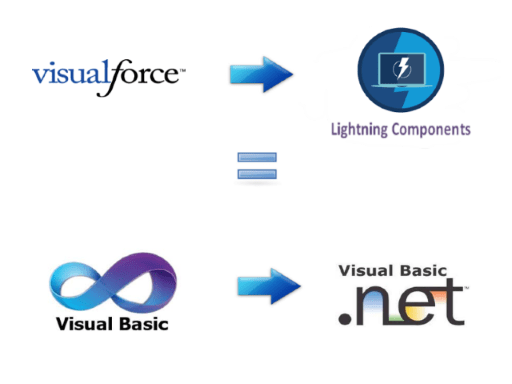
I feel like I have learned from mine. But the funny thing is that I can see a familiar pattern emerging now in the world of Salesforce development. I can see how the introduction of the Lightning framework will bring about some of the same challenges for Salesforce developers transitioning from Visualforce as there was for Microsoft developers transitioning from VB to .NET.

VBToLightningSmaller

Some VB developers transitioning to .NET were never able to make the transition successfully and their careers suffered as a result. I imagine this might happen in the Salesforce world too and there will be Visualforce developers that stay Visualforce developers.

Of course, Visualforce is not going away anytime soon. But, anyone that believes it will not go away eventually is just kidding themselves. Salesforce is firmly committed to Lightning and it is no doubt the future of Salesforce development.

So, what should you do if you are a Salesforce developer that knows a lot about Visualforce?

You should embrace the new Lightning development framework and seek to understand how it differs from traditional Visualforce development. It really is like comparing apples and oranges. Begin by checking out this excellent Trail called Applying Visualforce Skills to Lightning. It helps to warn you about some of potential pitfalls you may encounter.

Just like with VB and .NET, design patterns that worked well in Visualforce, will fail in the world of Lightning. You could easily make an application perform worse if you just attempt to swap one set of code for another.

And so this is a good time for me to tell you about a new course I just started to design for Pluralsight. It will be titled Lightning Component Development Best Practices and I hope to release it before the end of the year.

In the meantime, you can also check out my latest course on Pluralsight titled,  Customizing Salesforce with Lightning Components. I have an entire module dedicated to Working with Lightning Data Service and using Base Lightning Components, which are definitely best practices Lightning developers should be using now.

And stay tuned because I will be covering many best practice topics (such as this one about Conditional Rendering in Lightning) on this blog in the months to come.


Trailhead + Pluralsight = Successful Salesforce Developer

SFSucess

When I discovered Salesforce in 2011, the best way to learn all about it was to go through the Force.com Workbook, which has now been retired. I want to say the workbook was over 400 pages long and even though it did contain a ton of useful information, it was a bit dry and hard to read.

Fast forward to today and the old retired workbook has been replaced by a much improved source of information in the form of Trailhead. Trailhead uses the phrase, “The fun way to learn Salesforce” and they sure aren’t exaggerating.

Since it began in late 2014, Trailhead has grown quite a bit and just recently got it’s biggest update, which you can learn about here. If you are a developer that is interested in learning more about Salesforce, this is the way to go. Not only is the content free, but it is top quality. It is a GREAT, and as they say “fun” way to get introduced to any Salesforce related topic.

If you are interested in learning about Lightning (and who doesn’t want to learn more about Lightning?), and you are new to Lightning, check out:

And if you are already comfortable with the basics of Lightning and looking for something a little more challenging, then check out the following brand new modules:

But don’t stop with Trailhead. If you are really interested in becoming a Salesforce Ninja and earning a 6 figure income, then you need a subscription to Pluralsight too. I know developers tend to shy away from paying for anything, but the low cost of a Pluralsight subscription is more than worth it. And after all, if you are earning a 6 figure income, the low cost of a monthly subscription is nothing really.

The quality of the content on Pluralsight is unmatched by none. I know this because before I became a Pluralsight author, I produced courses/books for other vendors and none of them come close to Pluralsight. No one does more to ensure their authors will be successful and produce unique, quality content like Pluralsight. Period!!!

Also, as great as Trailhead is, it usually is only a starting point. It tells you the most important things you need to know, but tends to skip over a lot of the details. This is part of what makes it fun, but sometimes the details are good to know. Especially if you want to become a Salesforce Ninja, like I know you do. Well that is where the Pluralsight courses will come into play.

I know my two courses on Lightning, which you can find here, are loaded full of details that you will find no where else. The kind of details you get from blood, sweat and tears. From banging your head on the desk for hours before you finally figured out how something worked (NOTE: While I have not literally hit my head on the desk, I have certainly considered it enough).

And besides my two glorious Lightning courses, there are a bunch more about Salesforce (with more coming out everyday). In particular, I recommend:

Lightning Data Service Goes Beta in Summer 17

For the past two Salesforce release cycles the Lightning Data Service (LDS) has been in developer preview, but starting in Summer 17, it moves to Beta. The biggest thing to be aware of is that if you have created any code using the LDS, the markup will need to be changed. Prior to Summer 17, the LDS used the force:recordPreview tag, but this has been replaced with force:recordData.

If you have created code using the Lightning Data Service when it was in preview and named force:recordPreview, you will have to change your markup before that code will work in a Summer 17 org.

So what is the LDS?  (you may be asking yourself)

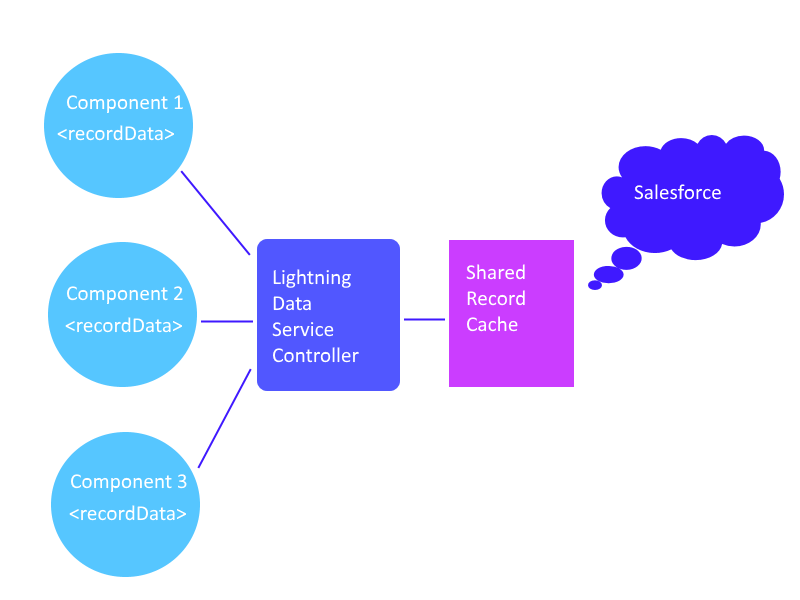
The LDS is on it’s way to becoming the standard controller (used in Visualforce) equivalent for a Lightning Component. It makes working with data in a Lightning component super easy (as in all you need to do to use it is add a single line of markup code). No Apex code is needed.

Another thing that makes the LDS so cool is that all Lightning components that utilize the recordData tag will have access to a shared data cache. This ensures that they return data as quickly as possible.

LDS.png

If you have not yet checked out the Lightning Data Service (LDS), this is definitely the time to do so. And if you are interested in seeing an example of how a Lightning Component can be greatly simplified using the LDS, go over to Pluralsight and check out my latest course titled,  Customizing Salesforce with Lightning Components. I have an entire module dedicated to Working with Lightning Data Service.

Lightning Best Practice: Conditional Rendering

For WhichMethoda long time I thought the best way to conditionally render elements in a Lightning component was to use CSS toggling. I thought this because if you look at the official Lightning Developers Guide where it talks about Dynamically Showing or Hiding Markup, the guide actually writes,
“Use CSS to toggle markup visibility. You could use the tag to do the same thing but we recommend using CSS as it’s the more standard approach.”

I have since learned that this is not really a best practice and the best method might be to use the built-in aura:if component. I discovered this by reading through a recently published article about Lightning Best Practices by Salesforce technical Evangelist, Christophe Coenraets in which he writes,

“The general guideline is to use the aura:if approach because it helps your components load faster initially by deferring the creation and rendering of the enclosed element tree until the condition is fulfilled. Components inside an aura:if with the value of its isTrue expression evaluating to false aren’t created and aren’t part of the DOM. Event listeners aren’t created either.”

So, which method is better for conditional rendering?

I do believe that Christophe is correct in stating the aura:if approach should be used generally. But there is a gotcha you really should be aware of when going down that path.

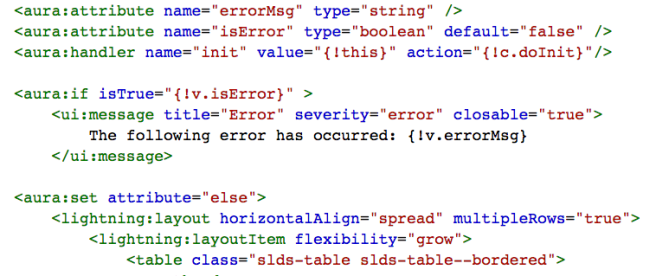
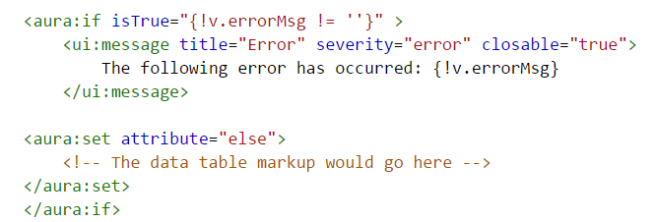
Ok, so let me explain this better with an example. Let’s assume you wanted to either render an error message if one was encountered while accessing data, or a table listing the data that was retrieved. You might use some markup code such as this:

AuraIfMarkup.png

The errorMsg attribute would be initially set with a value of blank in the doInit action. It would only have a value other than blank when an error was encountered.  And this would cause the message to be displayed. Makes sense, right?

The solution above will certainly work, but if you examine your console output, you will see a message such as the following:

Screen Shot 2017-05-30 at 5.37.15 PM

So, what is this message about?

Well, it is a performance warning message telling you that you have an aura:if tag that was switched from true to false in the same rendering cycle and this can cause avoidable work for the framework that slows down rendering time.

But, didn’t I start all this by suggesting that using the aura:if for conditional rendering was a better alternative?

It’s ok, there is a simple fix for this.  Instead of checking to see if the errorMsg attribute has a blank value, what you need to do is to add a second attribute called isError and make sure it uses a default of false, like this:

<aura:attribute name=”isError” type=”boolean” default=”false” />

You can then change the markup code to look like the following and you will no longer receive the warning message in the console.

Screen Shot 2017-05-30 at 6.23.41 PM

The message I am hoping to get across here is that, you really need to be aware of what is happening in terms of the Lightning Rendering Lifecycle, as that can have a big impact on performance.  AND most importantly, you need to always check your console log to look for performance warnings.

Good tip: Always check your console log for performance warnings.

I have no doubts that Lightning development is the future of all Salesforce development and that the future does look bright. And amazingly fast. It is just going to take a little time to work out all the kinks. And time for us developers to learn about what best practices are needed to make it really run that fast.

If you liked this post, then you might want to checkout my new course about Lightning development on Pluralsight titled, “Customizing Salesforce with Lightning Components: Getting Started


New Customizing Salesforce with Lightning Components Course Released

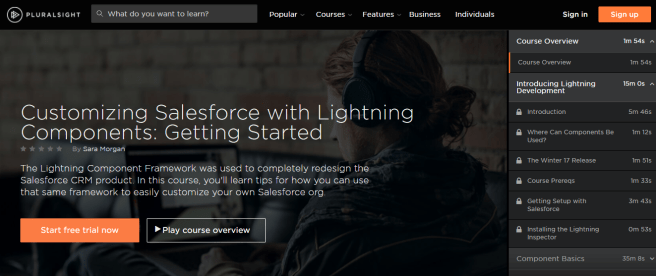
SecondCourse.pngI am proud to announce that yesterday my new course for Pluralsight titled, “Customizing Salesforce with Lightning Components: Getting Started” was released.

Here is the long description:

In this course, you’ll learn how to easily customize Salesforce with the new Lightning Component framework, which includes all the tools and technologies needed to build responsive and efficient components for any device. First, you’ll cover the basics of building Lightning Components, and how to work with data using built-in components such as the Lightning Data Service. Next, you’ll explore Lightning alternatives for the traditional JavaScript buttons that so many orgs have now. Finally, you’ll learn about the most efficient way to migrate from Visualforce to Lightning. Although, many things have changed during the evolution of the Lightning Component framework, don’t worry, you’ll learn what you need to know to get up to “lightning” speed. By the end of this course, you’ll be well on your journey towards customizing your org with Lightning components.

Specific topics I cover are:

  • Base Lightning Components
  • Lightning Data Service
  • Extending SLDS
  • Lightning Actions
  • Migrating from Visualforce to Lightning

Hope you like the course. I worked really hard on it, dedicating every weekend for the past 7 months. I wanted each module to be special and I hope my efforts show.

If you see the course, I would be really interested in your feedback – good or negative. All of it helps me to create better courses.

Initial Impressions of SalesforceDX

Last year at Dreamforce, Salesforce’s Wade Wegner unveiled a new initiative called SalesforceDX, in which Salesforce promised to make the Version Control System the source of truth and NOT the Salesforce org, as it is now.

SalesforceDX represents a VERY different way of development.

As a former .NET developer, who has long considered the Salesforce tooling to be anything but robust and not in line with some of the more modern development tooling, I was VERY happy to see this new development. I waited anxiously to hear more, and early this year, Salesforce announced it was ready to go into the pilot phase. I immediately signed myself and my company, SynapticAP up and was graciously accepted.

This post represents a summary of some of my initial impressions while being part of the pilot:

  • The team has done a GREAT job of putting together a set of streamlined tools that I think were well thought out and elegantly designed.
  • I see this as something of great interest to ISV partners and large enterprises, but not sure how valuable it would be to small/medium sized orgs with low or simplistic code bases, especially since it will likely be an extra service they will have to pay for.
  • Even though the Force.com IDE uses the CLI, or Command Line Interface, it seems to me that the design team intended for you to use the CLI as your primary method of managing your scratch orgs. When SalesforceDX is released, I am sure other third-party IDE’s will jump on to supporting it, and perhaps the visual tooling will get better, but as it is, the Force.com IDE does not seem to do everything that the IDE does and I suspect it may always be that way.
  • SalesforceDX represents a VERY different way of development. To be quite frank, Salesforce has been doing things wrong for many years (in terms of modern development standards), but SalesforceDX represents an attempt to remedy that. If you are a developer that has only worked with Salesforce, or you started your career as an Admin and then transitioned to development, you may find SalesforceDX kind of strange at first. This does not mean it is bad, it just may take you longer to adjust to the way things are done with the version control being the source of truth and not the org itself. It represents a shift in thinking about your org, so don’t expect to make this transition overnight. Give yourself some time and eventually things will start to make sense.

I look forward to the eventual release of this product as I am sure it will really help to propel Salesforce development into the next whatever. If you have a chance to work with the pilot or the eventual beta release, feel free to share your thoughts here in the comments.